Staging on Lovable With Your Own Supabase
Can a Lovable draft be your staging if you use your own Supabase? I tested three ways to do it. Here's what works, and what I'd set up.
Don't feel like reading? Link for agents
"Can I use a draft as my staging?" is the question I get most once someone learns that Lovable has drafts. If your backend is your own Supabase, the honest answer takes a whole post, and this is it.
Quick recap, in case you're landing here first. A draft is a copy of your Lovable project where you try a change before it reaches your users. On Lovable Cloud, the draft also gets a practice database of its own. With your own Supabase, it doesn't: the draft uses your real database.
So people ask the natural next thing. If the draft uses my production database, can I give it a different one?
Partly, and by hand. You can point the browser side of a draft at a second Supabase project, and with extra work the server side too. Structure changes still go to production. For real staging, you want a second environment, not a rewired draft.
Staging, by the way, is just the usual name for a copy of your backend that exists only for testing. I tried three ways of getting one: pointing a draft at a second Supabase project, moving the server side with an extra secret, and using a Supabase branch. The good news is that all three did something useful, more than I expected going in. Here is what happened with each.
Can I point the draft at a second Supabase?
This is the first thing most people think of: create a second Supabase project, call it staging, and tell the draft to use that instead.
People asked exactly this in the announcement thread on Reddit, so I tried it.
It helps to know where the connection lives. In a Lovable app there is a file called client.ts that holds the address of your Supabase project and its publishable key, the public key your app uses from the browser. Point the app at a different address and key, and it talks to a different project. So I gave the draft's chat the URL and publishable key of my staging project and asked it to switch.
I ran this test twice, three days apart, and Lovable did it differently each time. The first time it edited client.ts directly. The second time it refused to touch that file, explaining that the connected project's files should stay as they are, and created a separate connection just for the page. Both times the result on screen was the same: the draft was reading from staging.
Reads, writes and logins from the draft all went to staging. Production stayed untouched, with a separate set of user accounts on each side. For a moment it looked like I had built a staging environment with one prompt.
Then the edges started to show.
The structure doesn't follow the draft. I asked for a new field while the draft was pointed at staging. The migration stayed inside the draft, as before, and saving failed, because the field didn't exist in staging.
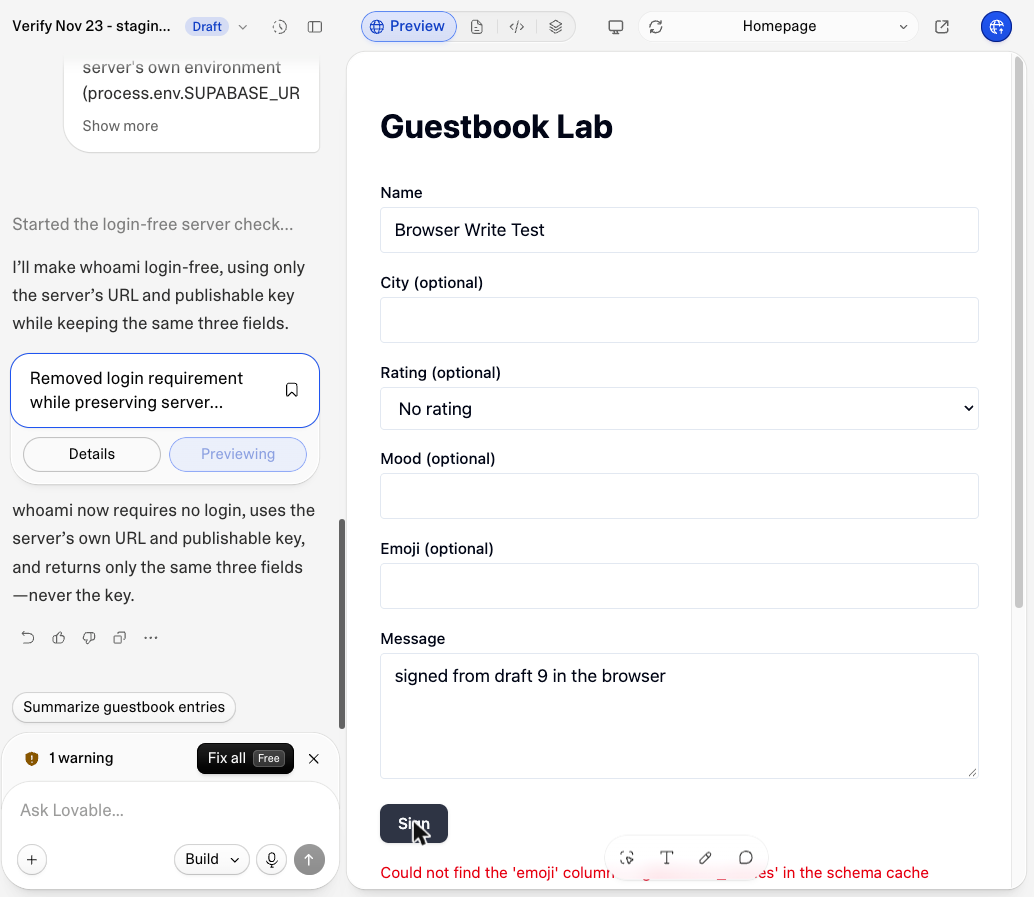
I added the field to staging by hand, and saving worked. When I accepted, Lovable applied the draft's migration to the project that's officially connected, which is production. It never went to staging. If you want staging to match, copying the change over is on you.
Accept brings the switch along. The switch is part of the draft's code, so accepting it meant my main project was now pointing at staging. Lovable's agent did warn me before I accepted. It's still an easy thing to do on a tired Friday.
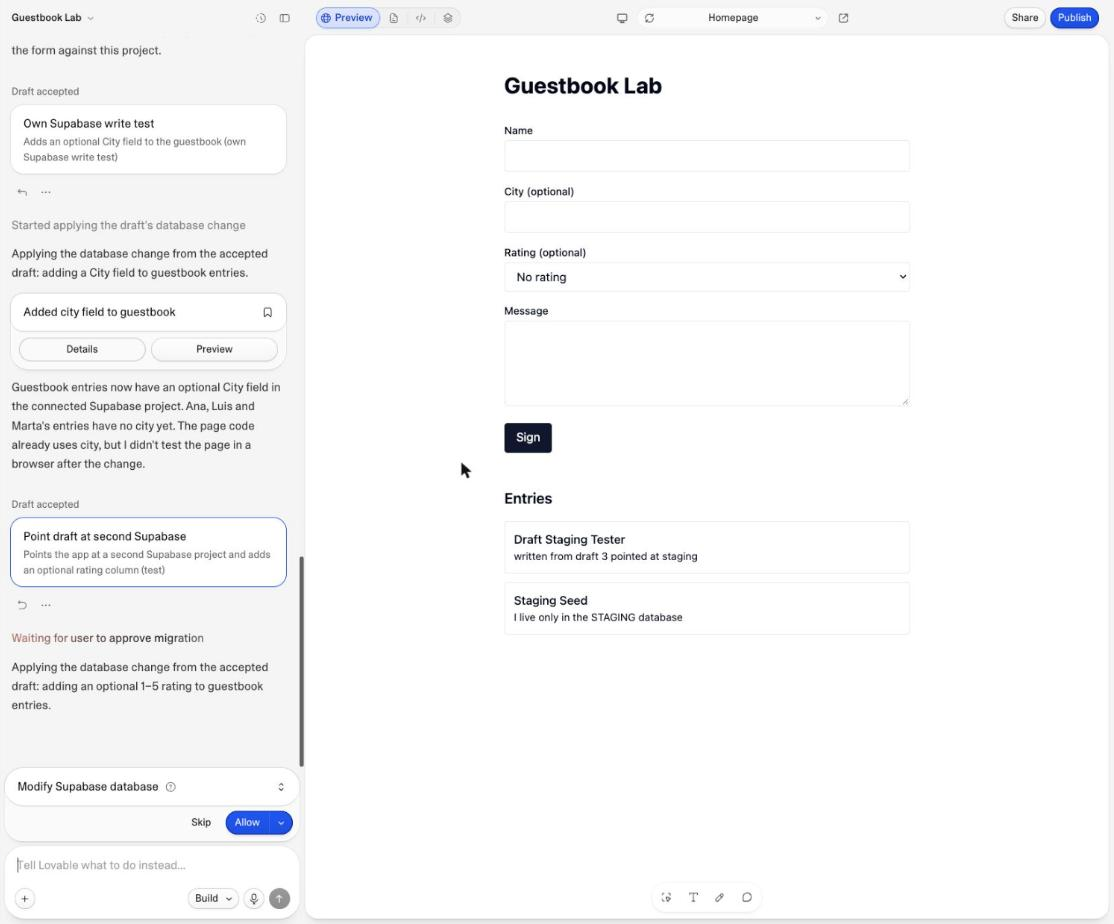
The preview takes a minute to catch up. In my first run, the draft's preview kept serving the old version for 60 to 80 seconds after the switch. In that window, what you type can still go to the database you thought you had left.
So it works, with a few steps to mind. The next test is the one I'd ask you to read twice.
The part to know: half of your app stays in production
To explain this one I need to split your app in two, because Lovable does.
Part of your code runs in the browser, on your visitor's device. That part uses the publishable key and has to obey your security rules. In Supabase those rules are called RLS, Row Level Security, and they decide who can see or change each row.
The other part runs on the server. Server functions are for the things you can't trust a browser with, and they use secrets: private values stored in your project, not in your code. One of those secrets is the service role key, which is a master key. Code that holds it skips your security rules entirely.
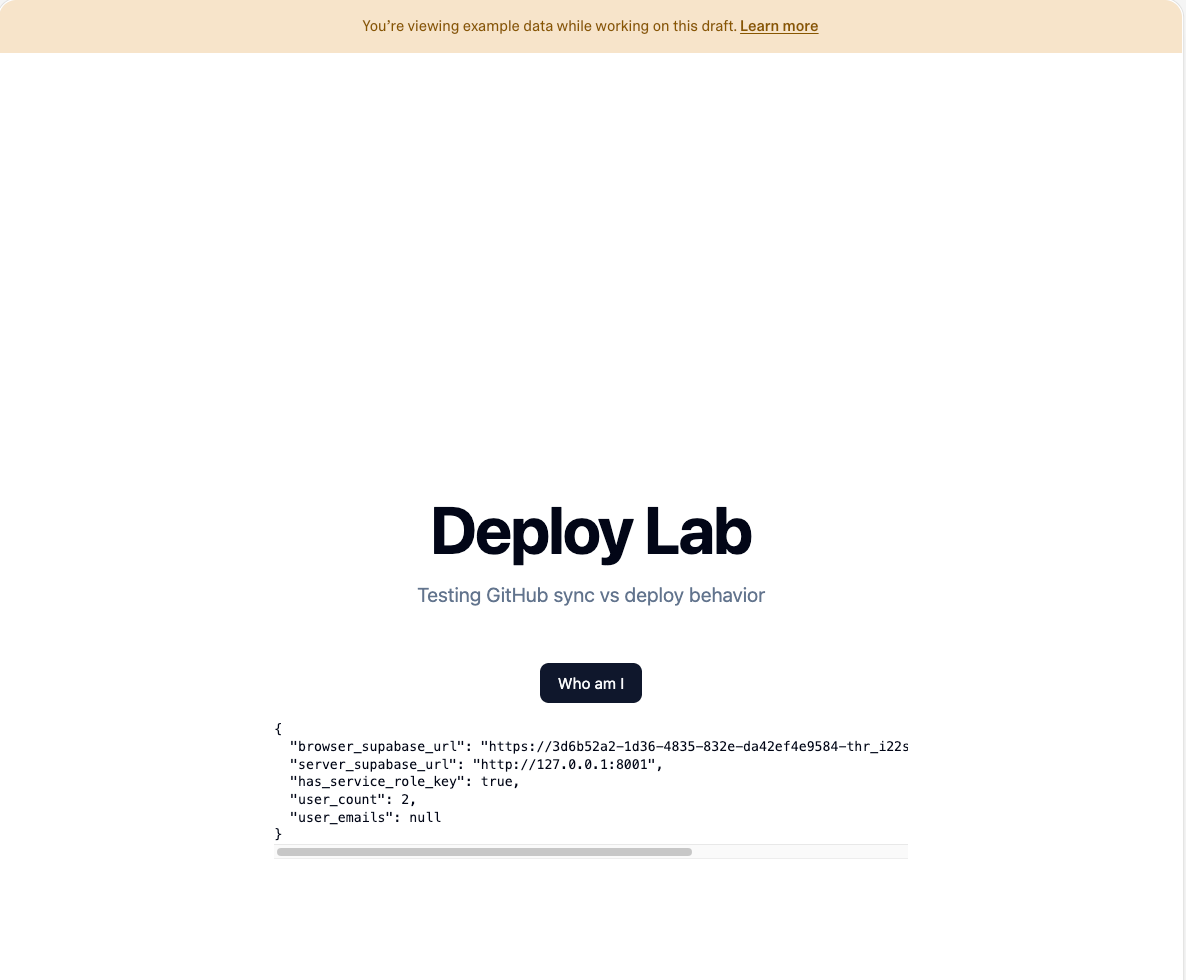
When I pointed the draft at staging, I changed the connection the browser uses. So I wanted to know what the server's side was doing. I added a small server function that reports which database it's talking to, and a button to call it.
This is what the draft showed me, on one screen, at the same moment:
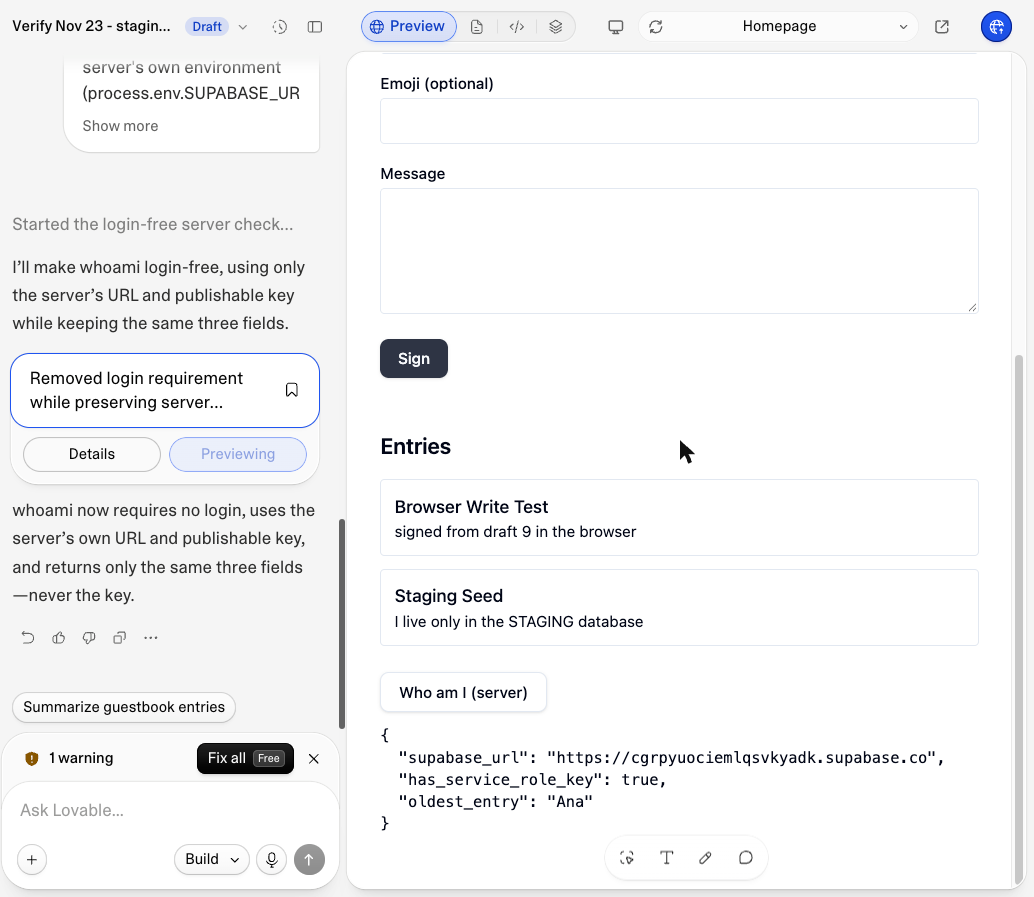
The list was reading from staging. The server function was reading from production.
The reason is that a draft's server code uses the secrets of the connected project, and those are your live ones. In my first run I tried editing the .env file inside the draft, which is where those values appear to live, and it changed nothing. So a draft "on staging" is really an app split in two, and the half that runs on the server is still in production, with the key that skips your rules within reach.
Put together with the structure changes from before, one draft ends up sending things to three different places:
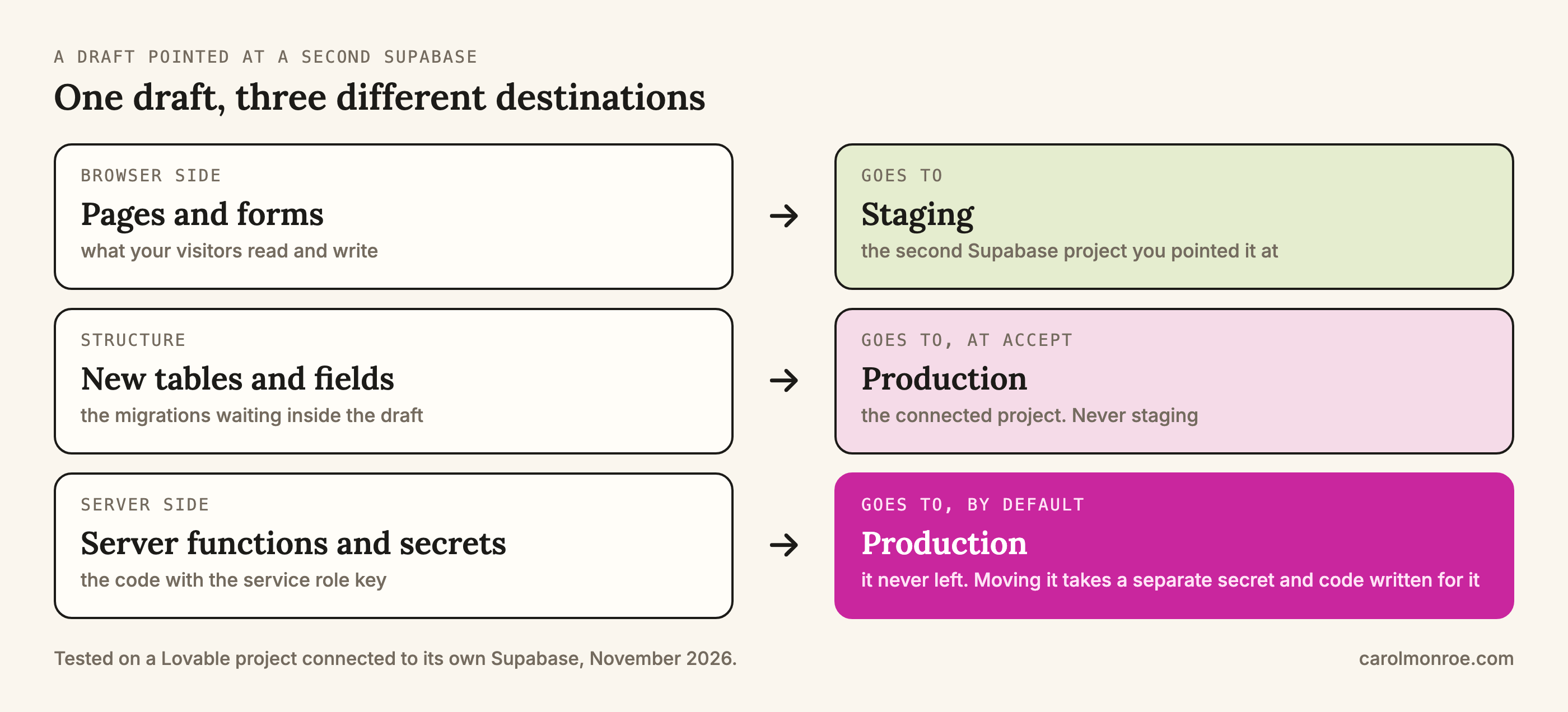
There was a second lesson hiding in the same test. The first time I ran it, Lovable's agent told me that both sides were talking to staging. The button said otherwise. Three days later, when I repeated the test for this post, the agent checked the server's environment before answering and told me plainly that the server stays on the existing database. That's a real improvement, and I was glad to see it.
I'd still press the button. Make the app prove where it is, instead of taking anyone's word for it, mine included.
For contrast, I ran the same check on Lovable Cloud. There it came out clean: the server function answered from the draft's own backend, and the two users it counted were the draft's example accounts.
Can the server side be moved too?
After that test, the obvious follow-up was whether I could drag the server half over to staging as well. The existing keys are off the table: they belong to the connected project, and every draft shares them with the live app. So I tried the only door left, which is a brand new secret with a different name.
I asked the draft to make its server function also read from staging, using a secret called STAGING_SERVICE_ROLE_KEY. Two things happened before it worked.
First, the agent couldn't ask me for the secret from inside the draft. It told me to add it in Project Settings, under Secrets, and warned me that it "applies to the whole project right away". So there is no such thing as a secret that only a draft can see.
Second, after I added it, the server still answered "Missing environment variable". A running server only picks up a new secret when it restarts. Once it did, this was the answer:
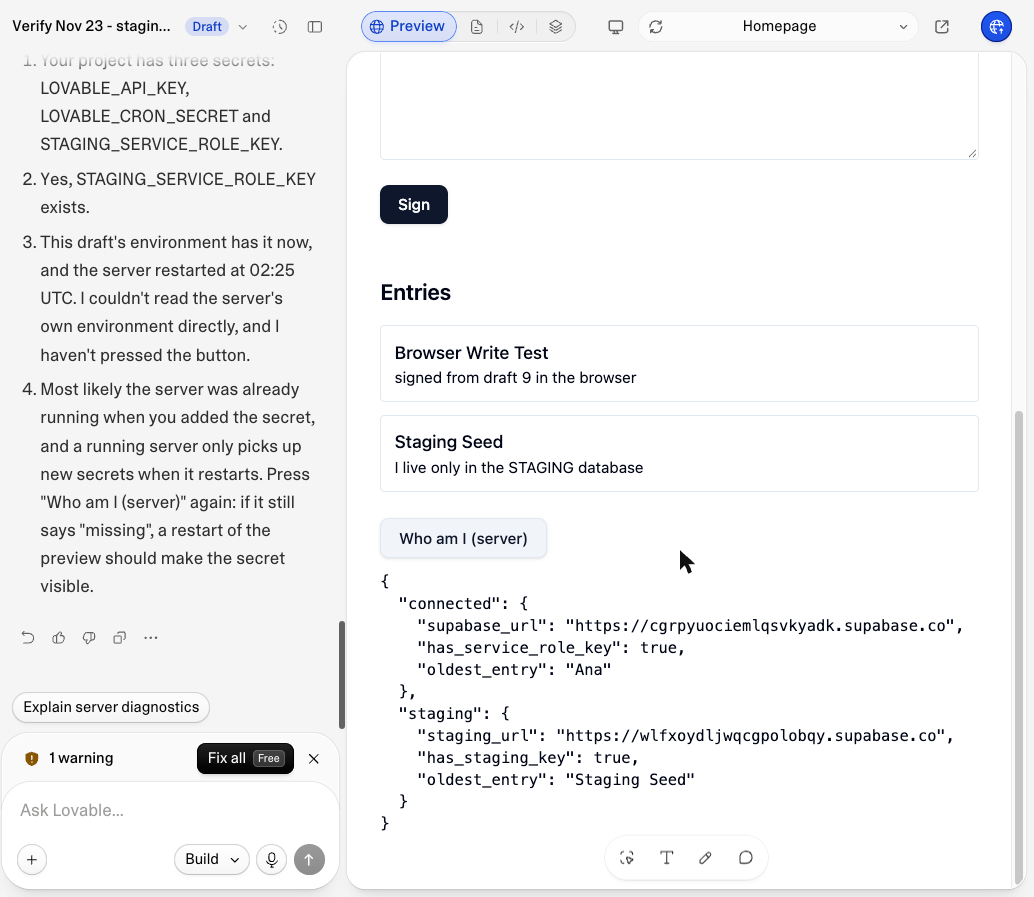
So yes, it can be done. The server side of a draft can talk to staging, if you give it its own key under a new name and write the code to use it.
It works, and it's handy for a quick test. I'd keep it to that, for three reasons. The staging key now lives in the same project as your production keys. Every piece of server code has to be written to pick the right one, and nothing in the server tells the code "you are running in a draft". And all of that wiring is part of the draft, so it has to come back out before you accept.
What about a Supabase branch?
Supabase has its own answer to all of this, called branching. A branch is a separate copy of your project made for testing, with its own address and its own keys. It's available on the Pro plan and up, and a branch is billed by the hour while it exists. Enough people have asked me whether it works with Lovable that I tried that too.
Three things I saw:
- The branch arrives with your structure. Supabase builds a branch from your project's migration history, and the changes Lovable applies when you accept a draft are recorded there. My branch came up with every table, field and rule in place, and none of the entries people had written through the app.
- Lovable doesn't see it. There is no branch picker in Lovable. To a draft, a branch is one more Supabase address with its own keys, so you'd use it by hand, the same way as the staging project above. I didn't point a draft at the branch this time.
- Merging the branch works, and Lovable copes with it. I added a field on the branch and merged it from the Supabase side. Production got the field, and its data was untouched. Then I accepted a Lovable draft that added that very same field. The database answered that the field already existed, and Lovable took that as "already done" and moved on.
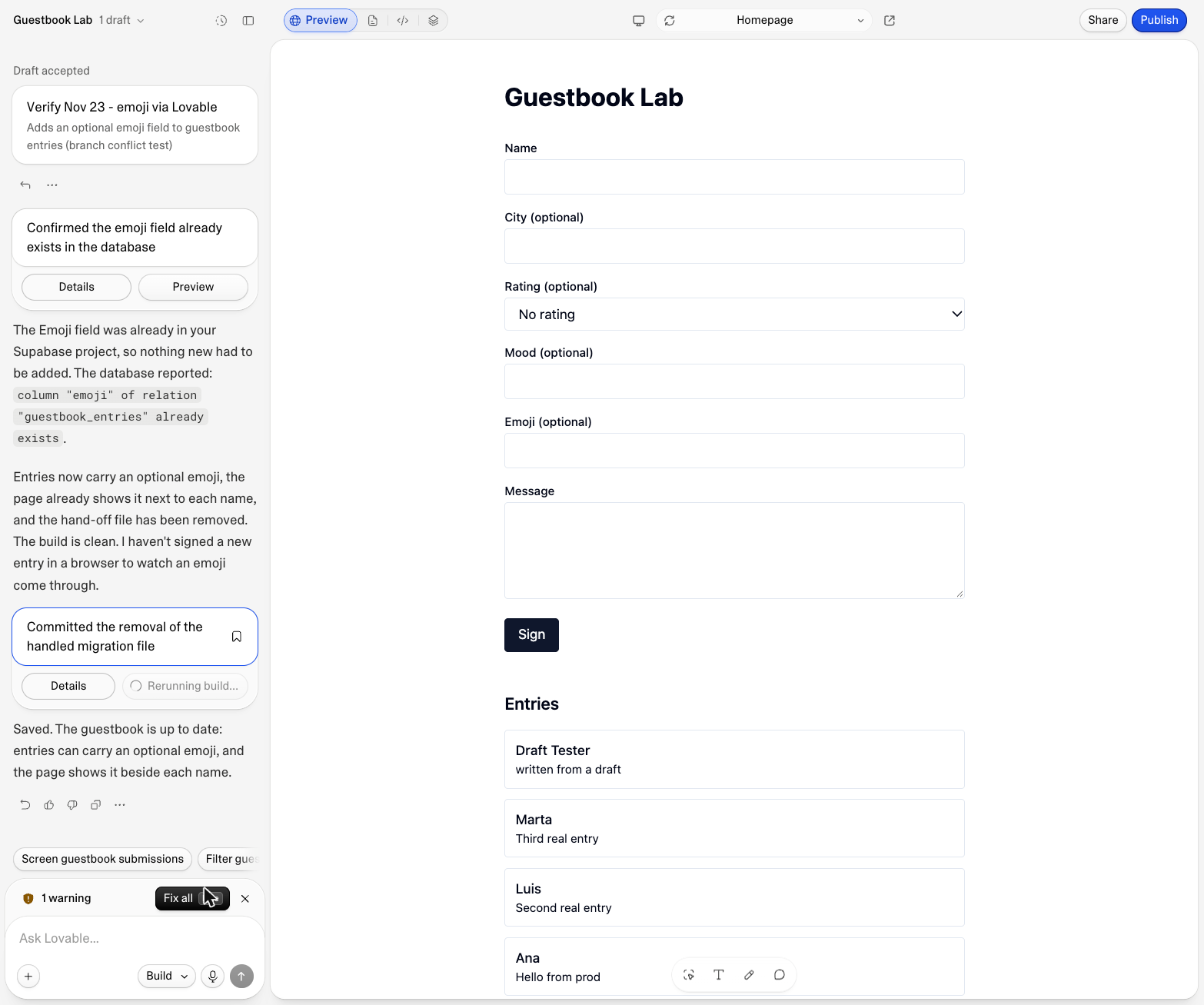
So a branch saves you from copying structure by hand, and it gives you a second route to production on the Supabase side. I'd still keep to one route per change. Mine was a single new field, and I wouldn't count on the two routes agreeing about anything more complicated.
If you still want to try it
Sometimes a quick test against staging is all you need, and the browser side is enough for it. If that's you, this is the order that worked for me:
- Create the draft and ask it to point the app at your staging project.
- Wait about a minute, until the preview really switches.
- Test your data flows. Skip anything that runs on the server, unless you gave it its own staging secret.
- Copy any structure change into staging by hand.
- Ask the draft to point back to production before you accept.
- Accept, then press Allow on the migration.
Step 5 is the one that matters. Everything else is recoverable.
What I'd actually use
So where does that leave you? There are three ways to work on the table now, and this is how they compare:
| A draft, as it comes | A draft pointed at a second Supabase | A separate staging project | |
|---|---|---|---|
| Your code | A copy | A copy | A copy, in a second Lovable project |
| Your data | Production | Staging, from the browser only | Staging |
| Structure changes | Wait in the draft, reach production at Accept | Reach production at Accept, never staging | Go to staging first, then to production |
| Server-side code | Runs against production | Still production, unless you add a separate secret and rewire it | Runs against staging |
| Have I tested it? | Yes | Yes | Not end to end yet |
For work that doesn't touch data, they're as good as ever. A redesign, new wording, a new page layout: the code is a real copy, and that's all those changes need.
For work that changes data or structure, I point people to a real second environment. You end up with a pair on each side: one Lovable project and one Supabase project for production, which you already have, and one of each for staging.
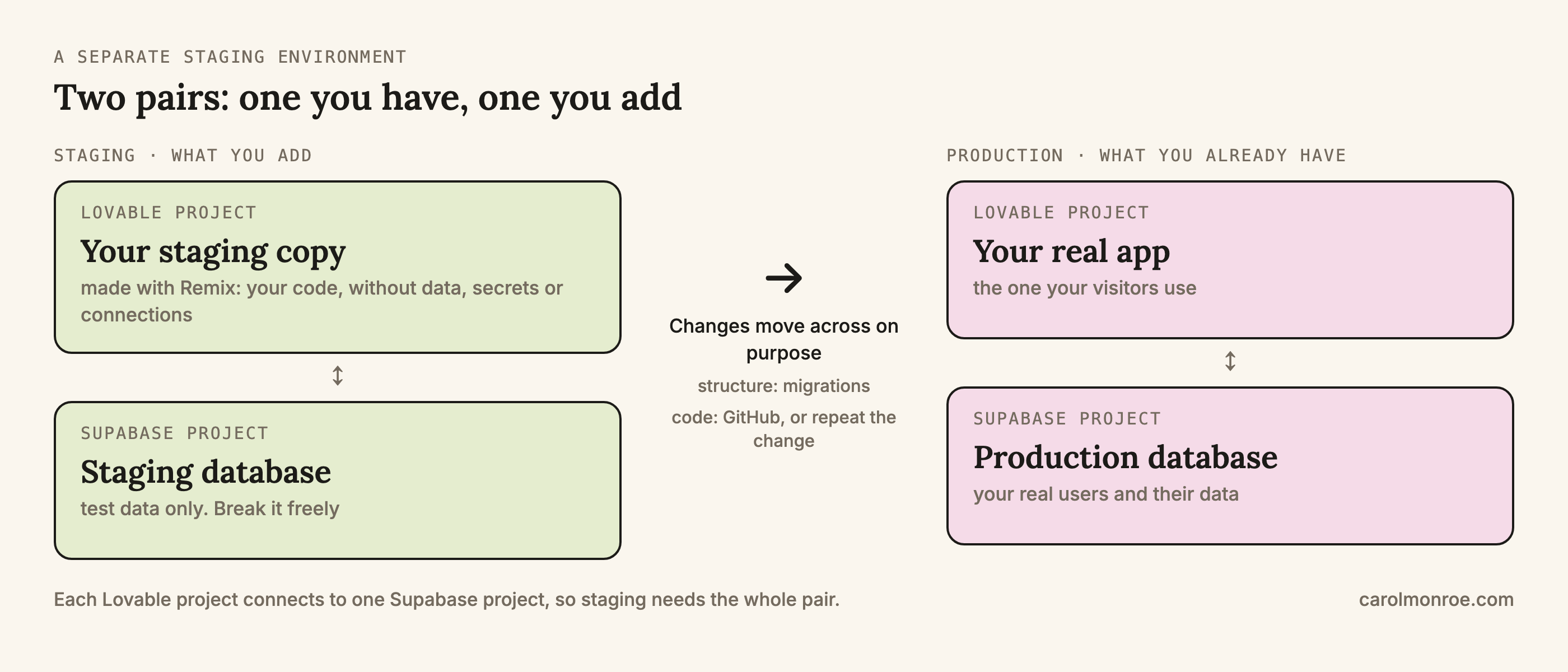
Getting there takes four steps:
- A second Supabase project for staging. Your current one stays as production, untouched.
- A second Lovable project, made with Remix. Remix gives you a copy of your project's code. It does not bring your data, your custom domain or your connections. Secrets you added by hand can come along, so swap in staging values before you test.
- Connect the staging Supabase to that copy. Then check where the copy is pointing, because a fresh remix can still carry the production address.
- Move changes across on purpose. Structure travels with migrations, and the supabase team has a guide on managing environments for that. Code travels by repeating the change in production, or through GitHub.
I want to be straight about this part. I haven't run this setup end to end for this series, the way I ran every test above. It comes from helping people in the community set it up, and I know the two steps where they get stuck: connecting the second Supabase project, and moving code from one Lovable project to the other. I'll test it properly and write it up next.
What I can say today is why it's worth the setup: it's the only version where the browser and the server are both, without any doubt, away from production.
One last thing, straight from the docs because I haven't tested it myself: in every kind of draft, secrets and connected services use their live values. If your app sends an email or charges a card through a live key, that is real, even from a draft.
Where my map ends
I'd rather tell you what I didn't get to:
- Supabase edge functions that already existed in a project, edited from inside a draft. My test project wouldn't let me create new ones.
- Accepting a draft that carries the extra staging secret wiring, to see exactly what lands in the main project.
- Logins from a draft pointed at staging. My test app has no login screen.
I'll update this post when I get through them.
Quick answers
Can a draft use a second Supabase project as staging?
Partly. The browser side can point at staging. Migrations go to the connected production project. Server-side code stays on production too, unless you add a separate secret for staging and write the code to use it.
Can server-side code in a draft use my staging project?
Yes, with work. In my test it needed a separate secret with a new name, added in the project's settings, and code written to use it. The secret belongs to the whole project, and the server only saw it after a restart.
Does Supabase branching work with Lovable drafts?
Lovable has no branch picker, so a draft keeps using your production project. A branch can be used by hand, like any second Supabase address. In my test the branch arrived with the full structure, and merging it into production from Supabase worked.
What is the safest way to have staging with Lovable and my own Supabase?
A separate pair: a second Supabase project and a second Lovable project connected to it. It's the only setup where the browser side and the server side are both away from production.
If this saved you from testing against production by accident, leave a note in the reader margin below. I read every one.
This is the fourth post in my series on Lovable Drafts. The others: what a draft is and how it helps you, what Accept really changes, drafts with your own Supabase, and common questions and quick fixes.
I ran these tests on November 20 and repeated them on November 23, 2026, on a throwaway Lovable project connected to its own Supabase, with a second throwaway Supabase project as staging and a Supabase branch. Sources: the Drafts docs, the Supabase docs on branching and managing environments.
Reader margin
What stayed with you?
Leave one small mark in the margin.
Notes from readers
The margin is open. You can leave the first note.
Stuck with something like this? I fix it daily → Services