Lovable Drafts: Common Questions, Quick Fixes
An email that never arrives, a draft with no users, an Accept that stops. What each one means in a Lovable draft, and the quick fix.
Don't feel like reading? Link for agents
Drafts are one of my favorite things Lovable has shipped this year. They give you a safe place to try an idea, and the more I use them, the more I trust them.
They also behave a little differently from your main project, and the first time you notice, it's easy to think you broke something. An email doesn't arrive. The login page won't let anyone in. You press Accept and it stops with a message you've never seen.
You didn't break anything. I've spent the last week testing Lovable Drafts on throwaway projects, and I ran into everything on this page myself, some of it twice. Almost none of it was a bug. Most of it was the draft protecting my real app in a way nobody had told me about, and every item here has a quick fix.
I'm keeping this page alive, too. I follow new cases in the Lovable community every week, and when a new one comes up I test it and add it here.
If something in a draft surprises you, check three things first: whether the draft has the "example data" banner, whether the thing you're testing depends on real users or real email, and whether your change touched the database.
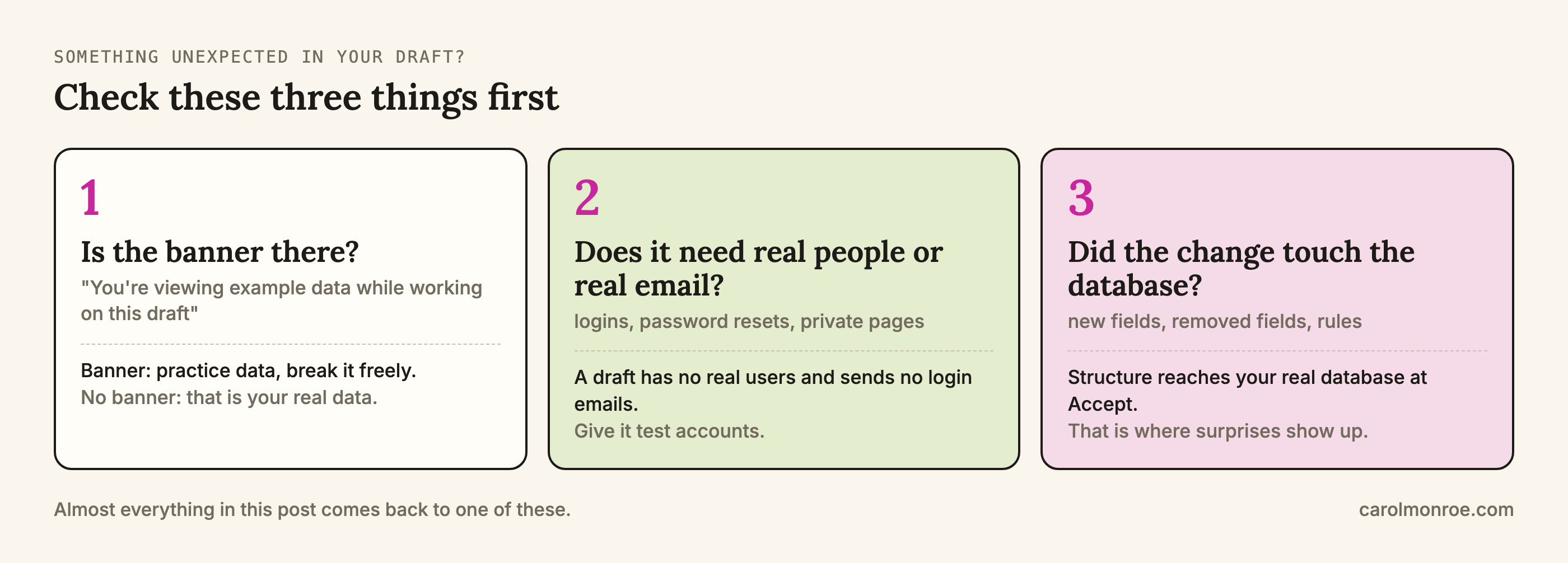
A draft, in case you're landing here first, is a copy of your Lovable project where you try a change before it reaches your users. On Lovable Cloud it usually comes with its own practice database. (What a draft is covers the basics.)
Here's the whole list, so you can jump to yours.
| What you're seeing | The short reason |
|---|---|
| The password reset email never arrives | Drafts with practice data don't send login emails |
| Nobody can log in to the draft | The draft starts with no user accounts |
| I can't test who sees what | Your practice data has only one user, or none |
| "Open preview" is greyed out | A new tab could show your real data |
| A table from my real database is missing | The draft is built from your migrations |
| The preview broke after Update | The draft and the main project changed the same table |
| I asked to remove a field and it's still there | Lovable blocks destructive changes by default |
| Accept failed with a database error | Your practice data is cleaner than your real data |
| My change vanished after accepting another draft | Two drafts edited the same thing |
| I reverted, and my database didn't go back | Version history only covers your code |
| I accepted, and the new field isn't there | With your own Supabase, a card is waiting for you |
| I changed real data from a draft | That draft was using your real database |
| My draft doesn't see the secret I just added | The server needs a restart to pick it up |
Let's go through them in the order you tend to meet them, starting with the ones about people and logins, because those come up the most.
Logins, users and emails
The password reset email never arrives
You're testing your login flow in a draft. You ask for a password reset, the app says "sent", and your inbox stays empty.
Nothing is broken. A draft with its own practice data doesn't send login emails. I tried both a password reset and a magic link, which is the "email me a link to sign in" option. Both answered that the email was sent, and nothing arrived. Signing up behaved differently too: the new account was confirmed instantly, with no confirmation email at all.
What to do: test anything that depends on a real email in your main project or on your published site. Use the draft for everything around it, like how the login page looks and what happens after someone is signed in.
Nobody can log in to the draft
You open a draft of an app that has user accounts, try to sign in with your usual login, and it doesn't work.
That's the draft protecting you. A draft with its own practice data doesn't contain your real users. Lovable's docs mention demo accounts, but in my tests the drafts started with no accounts at all.
What to do: give your drafts test accounts. Lovable builds each draft's practice data from a file in your project called db/seed.sql. A seed file is a list of starter rows that a fresh database begins with. I asked Lovable to add two test accounts to that file, and from then on every new draft started with both of them, ready to sign in.
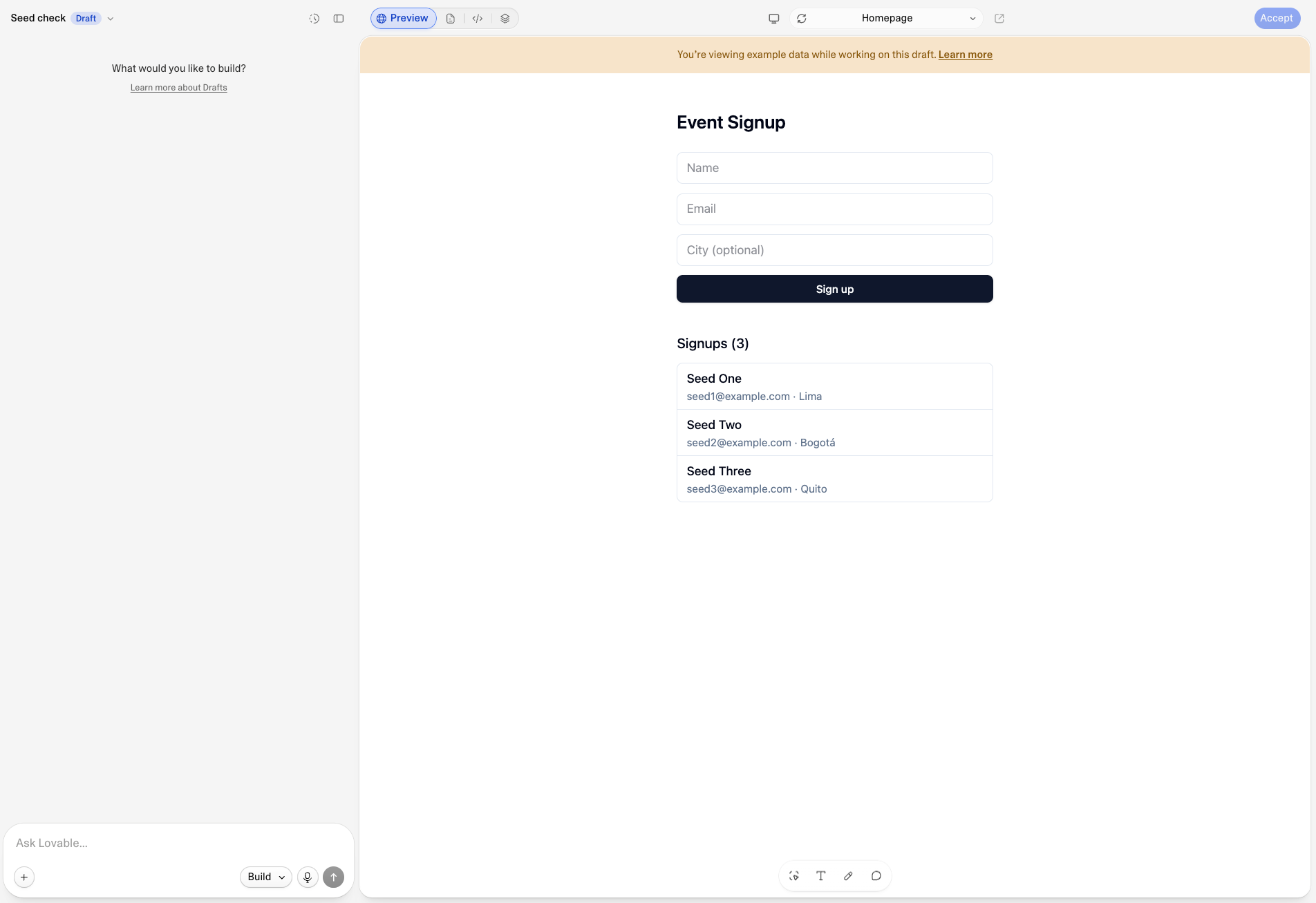
Two things worth knowing. Those test accounts never reached my real database when I accepted the draft. And their passwords are written in that file, inside your project, so never reuse a real password there.
I can't test who sees what
This one is quieter. You build a private page, something like "my notes", where each person should only see their own. In the draft it seems to work. But you only have one user, so you can't tell whether the page is hiding other people's notes or there simply aren't any.
The rules that decide who can see each row are called RLS, Row Level Security, and they do come along into the draft. What's missing is the second person.
What to do: seed two accounts and a few rows for each. I did exactly that with two test users, Alice and Bob, and two notes apiece. Then I signed in as each of them inside the draft:
| Signed in as | Notes on screen |
|---|---|
| Alice | Her 2 |
| Bob | His 2 |
| Nobody | 0 |
That's the test that tells you the page is safe, and it only works when the practice data has someone to hide.
While you're building
"Open preview" is greyed out
In your main project you can open the preview in a new browser tab. In a draft with its own practice data, that button is disabled.
Hover over it and Lovable tells you why:
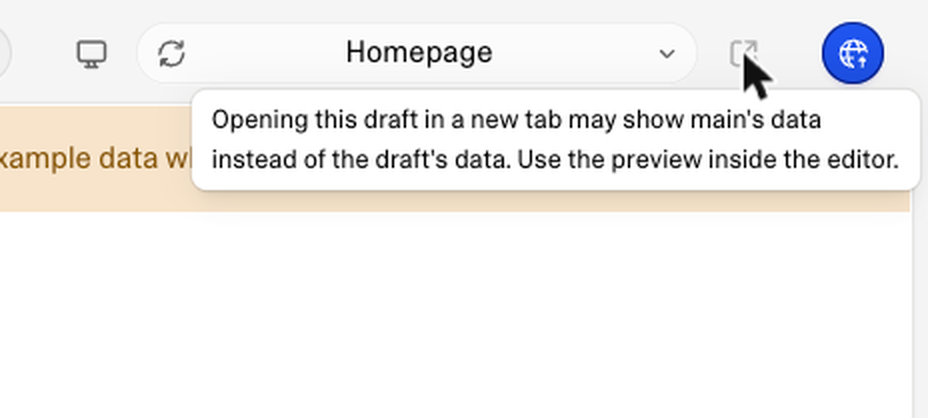
What to do: review anything with data inside the editor. The draft's preview link is still great for showing design and wording to anyone you've invited to the project. It asks for a Lovable login, so it won't open for someone outside it.
A table from my real database is missing in the draft
You know the table exists. It's right there in your real database. But the draft acts as if it had never heard of it.
I assumed at first that a draft's database was a copy of the real one. It isn't. Lovable builds it from your project's migrations, which are the small instruction files that record each change to the shape of your database. A table I had created directly in the real database, by running SQL by hand, never showed up in a new draft, because no migration knew about it.
What to do: make database changes through Lovable, so they're recorded. If you already created something by hand, you can catch the migrations up. I tested this one end to end: I made a table by hand, confirmed a new draft didn't have it, and then asked Lovable this in the main project:
The table public.<your_table> already exists in the live database. I created it by hand, so no migration knows about it. Add a migration that records it exactly as it is now, written so it is safe to run where the table already exists. Do not change or delete any data.
The next draft I created had the table. It came up empty, which is how it should be: the structure travels, your real rows don't.
The preview broke after Update
Update is the button that brings the latest changes from your main project into a draft. I pressed it once and the draft's preview stopped working.
The cause was that both sides had changed the same table: the main project in one way, the draft in another. When they met, they clashed.
What to do: press "Fix error". It repaired my draft, and it didn't cost credits. One side effect to expect: the draft's practice data was reset to its starting rows.
I asked to remove a field and it's still in the database
You ask a draft to delete a field you no longer need. The field disappears from your app's screens. Later you look at the database, and the column is still there, data and all.
Lovable does that on purpose. Removing or renaming something in the database is called a backward incompatible change, meaning older code can't live with it, and those changes need a permission named "Execute backward incompatible database migrations". It's off unless you turn it on. I asked two different drafts to drop a field, days apart, and both times Lovable refused, retired the field so the app stopped using it, and told me exactly which setting was in the way.
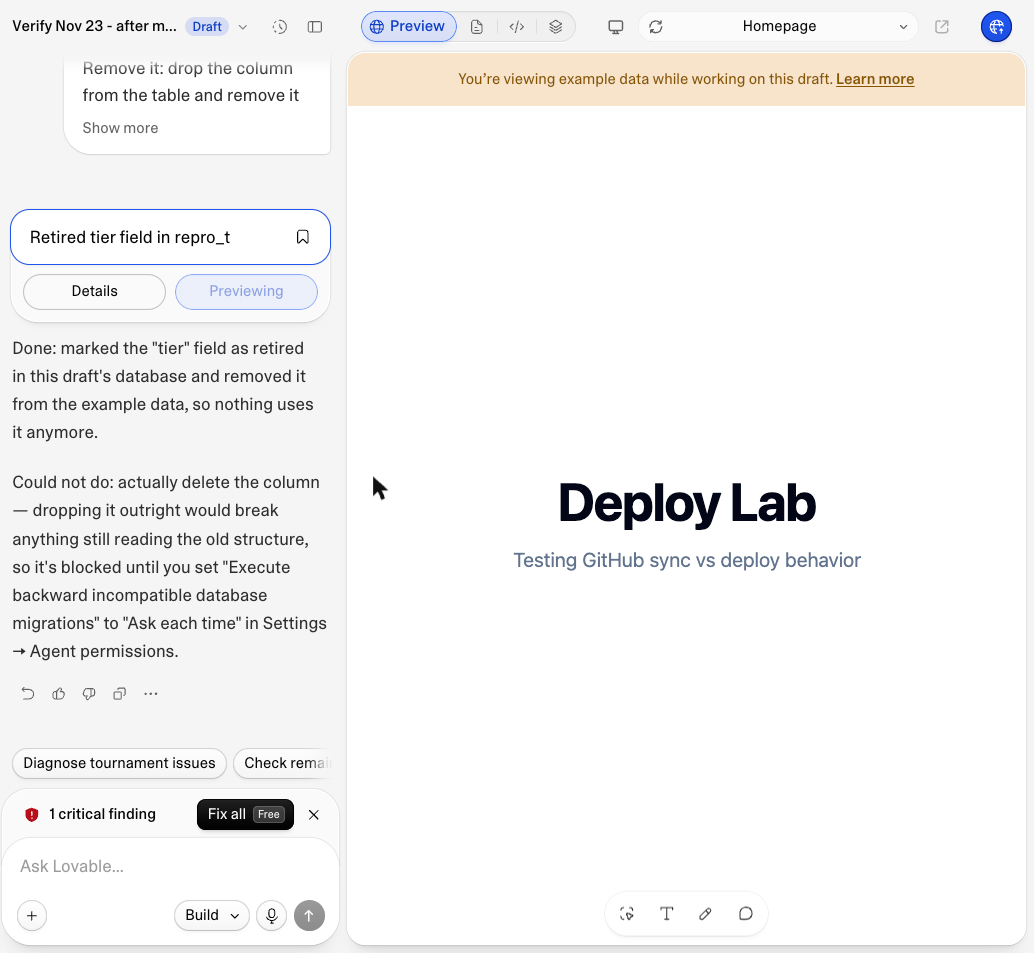
What to do: nothing, if you just wanted it gone from the app. The message names the setting that would allow a real delete. I left it off, and I'd suggest the same unless you have a good reason: that guard is what stands between a careless prompt and a deleted column. If you do turn it on, export your database first.
When you accept
Accept failed with a database error
This is the one that makes people nervous, and it comes with the best news on this page. Everything worked in the draft. You press Accept, and it stops with a database error, often with a code like P0001.
The good news first: a failed Accept changes nothing. In my tests, no structure and no code reached the main project, and the full error was shown so I could read it.
Why it happens: your draft was practicing on data that's cleaner than real life. In the case I reproduced, the real database had a deleted record protected by a rule, and the practice data had none. The change sailed through the draft and hit the rule the moment it met the real data.
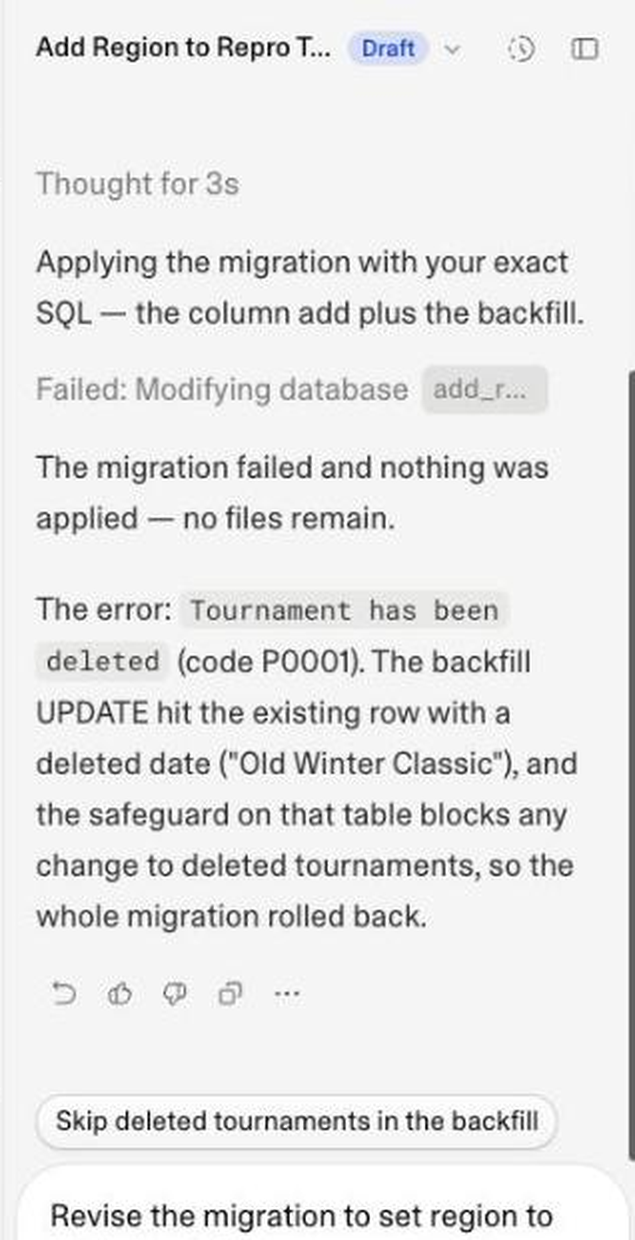
What to do, in two parts.
To get unstuck today: the failed change can't be edited inside that draft, and Update only repeats it. Start a new draft with the corrected change, and bring the rest of your work over by asking Lovable:
Copy these files from commit <sha> using git show, without importing its migrations: <paths>
Send it from a fresh draft. A draft only sees changes that existed when it was created, so an older draft will say it can't find the commit.
To stop it happening again: add your messy cases to db/seed.sql, such as deleted records, old values and empty fields. Once I did that, the same mistake failed inside the draft, where it's free, and I could fix it right there.
The full story, with the test, is in what Accept really changes.
Two smaller surprises after Accept
These two are quick, so here they are side by side.
| What you see | Why | What to do |
|---|---|---|
| My change vanished after I accepted another draft | Two drafts edited the same thing, and the last one you accept wins. Lovable doesn't ask | Compare versions in drafts, then pick one, accept it and delete the others |
| I reverted, and the database didn't go back | Version history is a history of your code. The database has its own life | Use the daily backup, or an export you made before accepting |
When two drafts touch different things, there's no conflict at all. I accepted two of them a second apart and Lovable simply queued them.
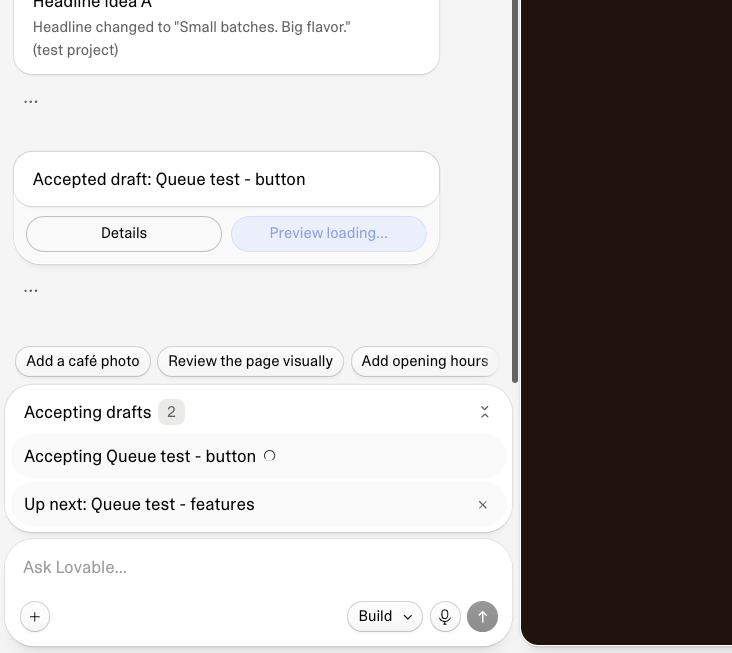
The second row is why I now export my database before every Accept that changes it. Lovable's docs explain how to export.
If you use your own Supabase
A few surprises only show up when your project is connected to your own Supabase instead of Lovable Cloud. They all come from one fact: in that setup, a draft uses your real database.
I changed real data from a draft
You added a few test entries in a draft, deleted the draft, and the entries are still in your real app.
With your own Supabase there is no practice database and no "example data" banner. What you add or delete from the draft is real, immediately, and deleting the draft doesn't undo it. A test entry I wrote from a draft on November 17 is still in that database today.
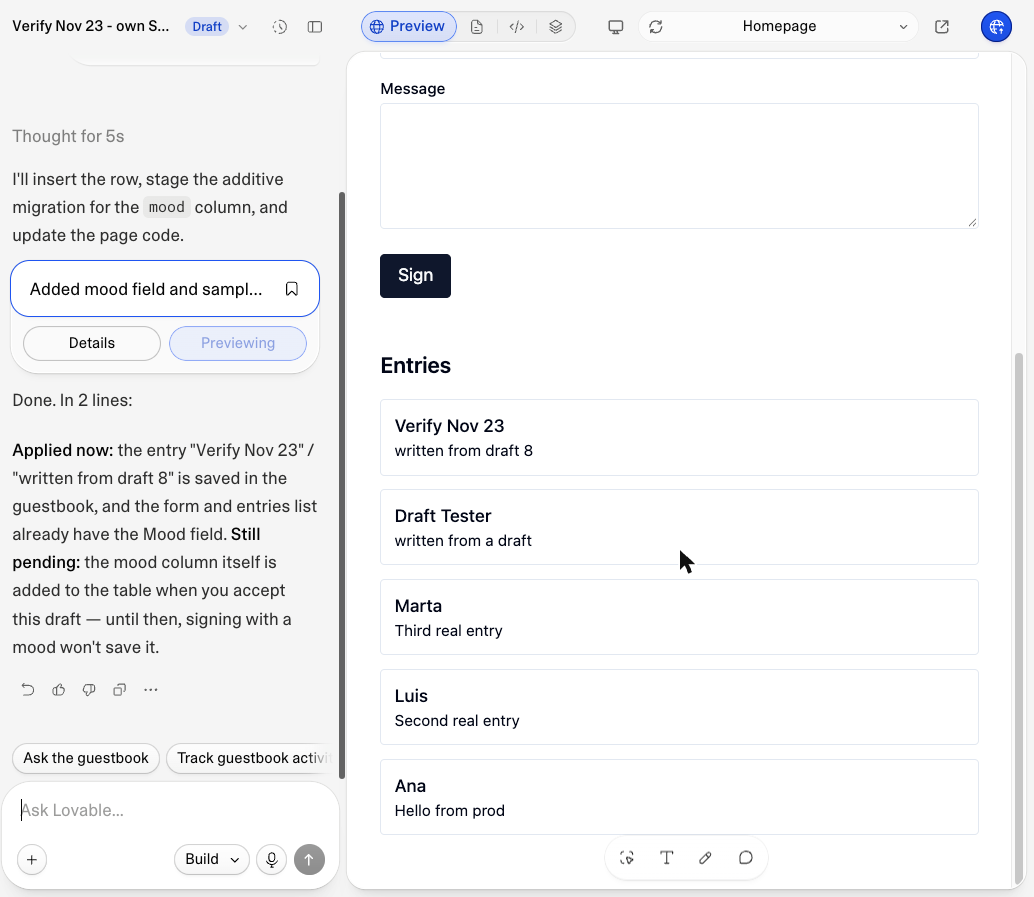
What to do: before touching data in any draft, look for the banner. No banner means production. Clean up the test rows by hand.
I accepted, and the new field isn't there
You accepted a draft that added a field. The form shows the new field, but saving fails, or the field simply isn't in the database.
With your own Supabase, Accept has one more step. A card appears in the main chat, titled "Modify Supabase database", with Skip and Allow buttons. Until you press Allow, your main project has the new code and no field behind it.
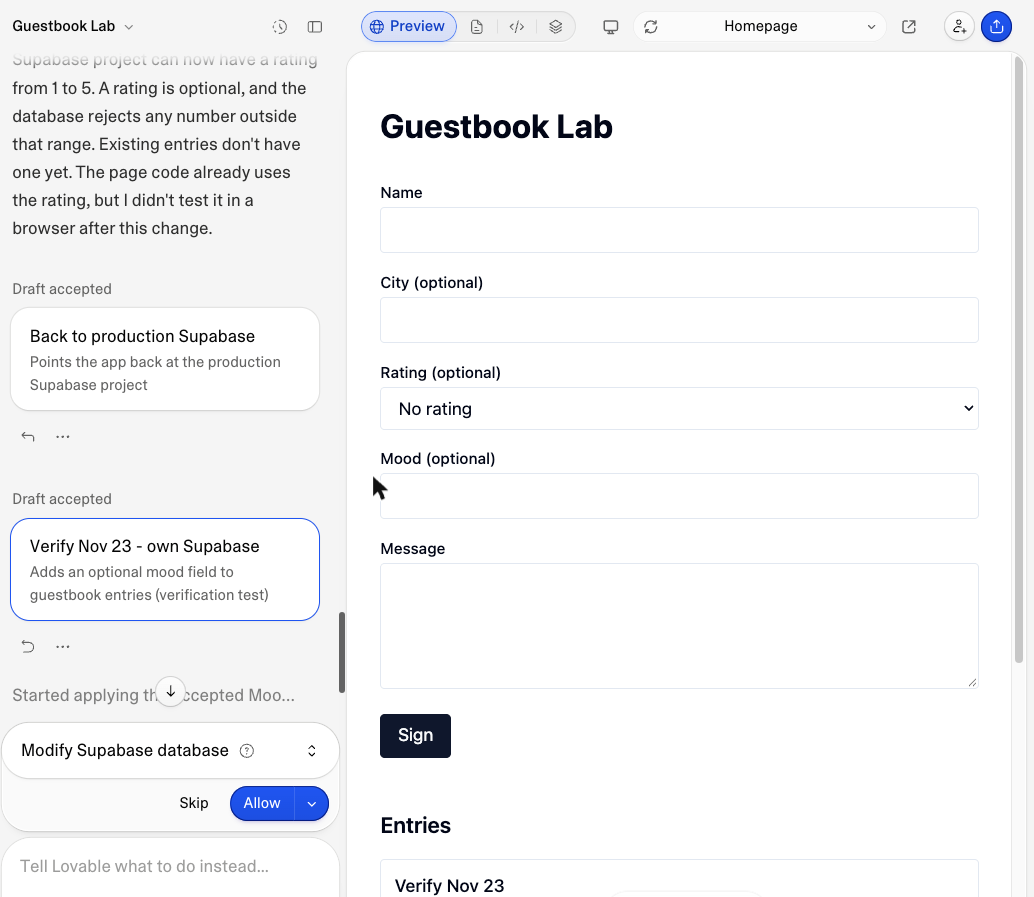
What to do: go back to the main chat and press Allow.
My draft doesn't see the secret I just added
You add a new secret, which is a private value like an API key, and the server-side code in your draft insists it doesn't exist.
Two things are going on. Secrets belong to the whole project, so they're added in Project Settings, not from inside a draft. And a server that is already running only picks up a new secret when it restarts. In my test the draft answered "Missing environment variable" for a few minutes, and then, without me changing anything, it worked.
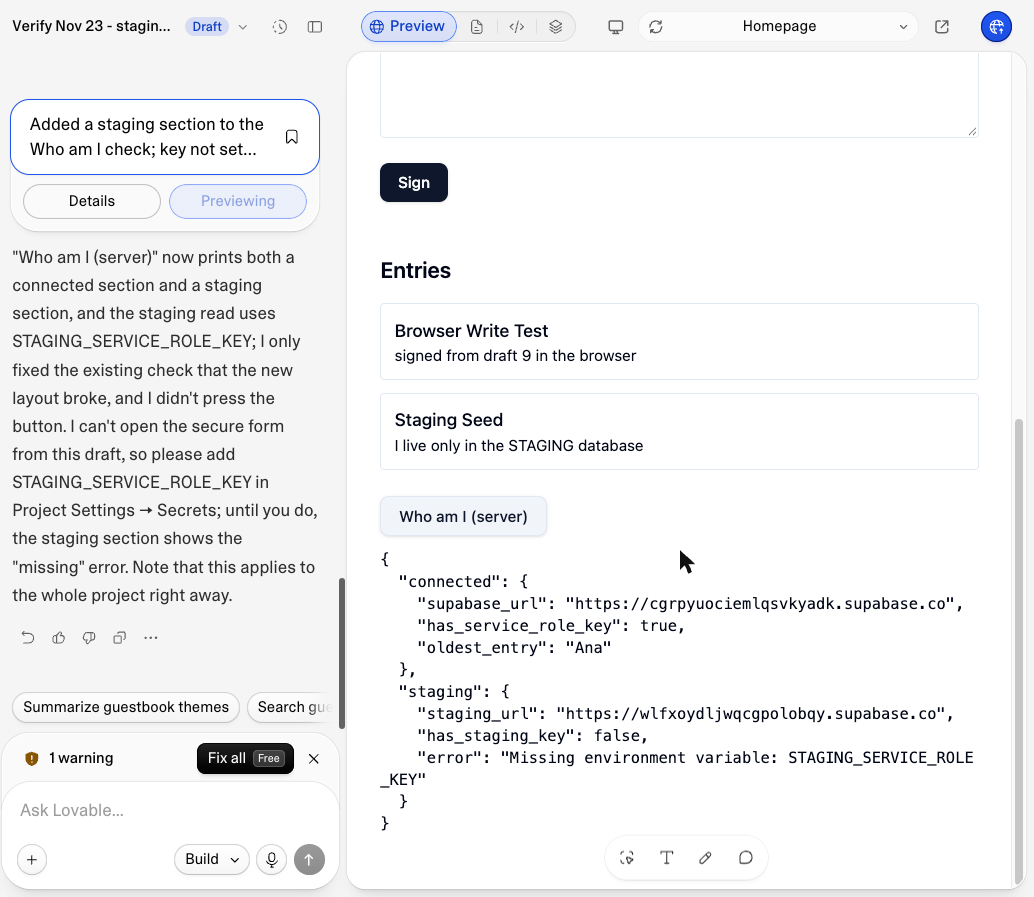
What to do: add the secret in Project Settings, under Secrets, and give the draft's preview a few minutes before you decide it didn't work.
Both of the last sections have more behind them. Drafts with your own Supabase explains the differences, and staging on Lovable with your own Supabase covers what to do about them.
One more thing worth knowing
From inside a draft, Lovable's agent could still read my real database. I asked it to compare something, and it queried production and listed a real account's email in its answer.
That's often useful, because the agent can compare your draft against the real thing. It just helps to know what kind of safety a draft gives you: it isolates what you write. It doesn't hide your real data from the agent.
The big picture
If you read this whole page in one go, it can sound like a lot. It isn't. Every item here is a draft doing what it was built for: keeping your real app, your real users and your real data out of reach while you experiment. Once you know these, drafts get more fun, because you stop second-guessing them.
Quick answers
Why don't emails work in my Lovable draft?
A draft with its own practice data doesn't send login emails. Password reset and magic link both answered "sent" in my tests and nothing arrived. Test email flows in your main project or on the published site.
Why can't I log in to my draft?
Because your real users aren't in it. A draft with practice data starts without your accounts. Add test accounts to db/seed.sql and new drafts will start with them.
What happens if Accept fails?
Nothing changes. In my tests no structure and no code reached the main project, and the full database error was shown.
Why is a table missing from my draft?
The draft's database is built from your project's migrations. A table created by hand in the real database, outside Lovable, isn't in them.
Why is "Open preview" disabled in my draft?
In a draft with its own practice data, a new tab can show your main project's data. Lovable disables the button to avoid that mix-up.
Why is my test data still there after I deleted the draft?
That draft was sharing your real database, which is what happens with your own Supabase. Data written from it is real and stays.
If one of these saved you an afternoon, leave a note in the reader margin below. And if you ran into something that isn't here yet, tell me there too. I'm following new cases as they come in, and I'll test yours and add it to this page.
This is the fifth post in my series on Lovable Drafts. The others: what a draft is, what Accept really changes, drafts with your own Supabase, and staging with your own Supabase.
I tested Drafts from November 17 to 23, 2026, on four throwaway projects of my own: two on Lovable Cloud, one connected to its own Supabase, and a landing page with no backend. Sources: the Drafts docs and the database backups docs.
Reader margin
What stayed with you?
Leave one small mark in the margin.
Notes from readers
The margin is open. You can leave the first note.
Stuck with something like this? I fix it daily → Services