Lovable Drafts With Your Own Supabase
Do drafts work the same with your own Supabase as on Lovable Cloud? The buttons do. The safety net doesn't: the draft uses your real database.
Don't feel like reading? Link for agents
In the first two posts of this series, a draft was a sandbox. You got a copy of your app, a practice database full of invented people, and the freedom to break things. Nothing real was touched until you pressed Accept.
All of that was true on Lovable Cloud. If your project is connected to your own Supabase, one sentence of that story changes, and it happens to be the most important one.
With your own Supabase, a draft uses your real database. There is no practice data and no banner. What you add or delete from inside the draft is real, right away.
Drafts are still useful in that setup, and I still use them. You just need to know which parts are a copy and which parts aren't. (New to drafts? Start with what a draft is and what Accept really changes.)
Can I use drafts with my own Supabase the same way as on Lovable Cloud?
That's the question behind this whole post, so here is the answer before the details.
No. The buttons are the same, and the safety net isn't. You create a draft, build in it, and accept or delete it exactly the way you would on Lovable Cloud. What changes is what the draft is connected to. On Lovable Cloud, a draft gets a database of its own. With your own Supabase, it uses your real one, and there is no setting to give it a second Supabase project instead.
Here are the two, side by side:
| Draft on Lovable Cloud | Draft with your own Supabase | |
|---|---|---|
| How you use it | New draft, build, Accept or Delete | Exactly the same |
| The database it uses | Its own, with example data | Your real one |
| The "example data" banner | Yes | No |
| Data you add or delete | Stays in the draft | Real, right away. Deleting the draft doesn't undo it |
| New tables and fields | You can try them inside the draft | They wait until Accept, then you press Allow |
| Server-side code | Runs against the draft's own backend | Runs against production |
| User accounts | Not your real ones | Your real ones |
So what's the best way to work, if your backend is your own Supabase?
- For design, wording and layout: use drafts exactly as you would on Lovable Cloud. Those changes don't touch your data.
- For anything that adds, changes or deletes data: treat the draft as if it were your live app, because for the database, it is.
- For real testing of data and structure: you need a separate staging environment. That one is big enough to get its own post: Staging on Lovable with your own Supabase.
The rest of this post is how I got to that table, one test at a time.
Why your own Supabase is different
Every Lovable app that saves data needs a backend, which is the part that stores your data and decides who can see it. There are two ways to have one.
Lovable Cloud is the backend Lovable creates and looks after for you. Because it's Lovable's to manage, Lovable can set up a small separate backend for each draft and fill it with example data. That's where the practice database comes from.
Your own Supabase is a Supabase project that lives in your Supabase account. You created it, you connected it to Lovable, and Lovable talks to it. Lovable does not create a copy of that project for each draft.
So when you open a draft on a project like this, you get half of the sandbox. The code is a copy. The database is the same one your users are on.
What that looks like in practice
I tested this on a small guestbook app connected to a Supabase project of my own.
The first thing I noticed was what's missing. On Lovable Cloud, a draft shows a banner that says "You're viewing example data while working on this draft". Here there was no banner, and the entries on screen were my real ones.
Then I asked the draft's chat to add an entry. It appeared in my production database instantly. Nothing about it said "draft". And deleting the draft afterwards doesn't take that entry back out, because the draft never owned it. A test entry I wrote from a draft on November 17 is still sitting in that database today, long after its draft was gone.
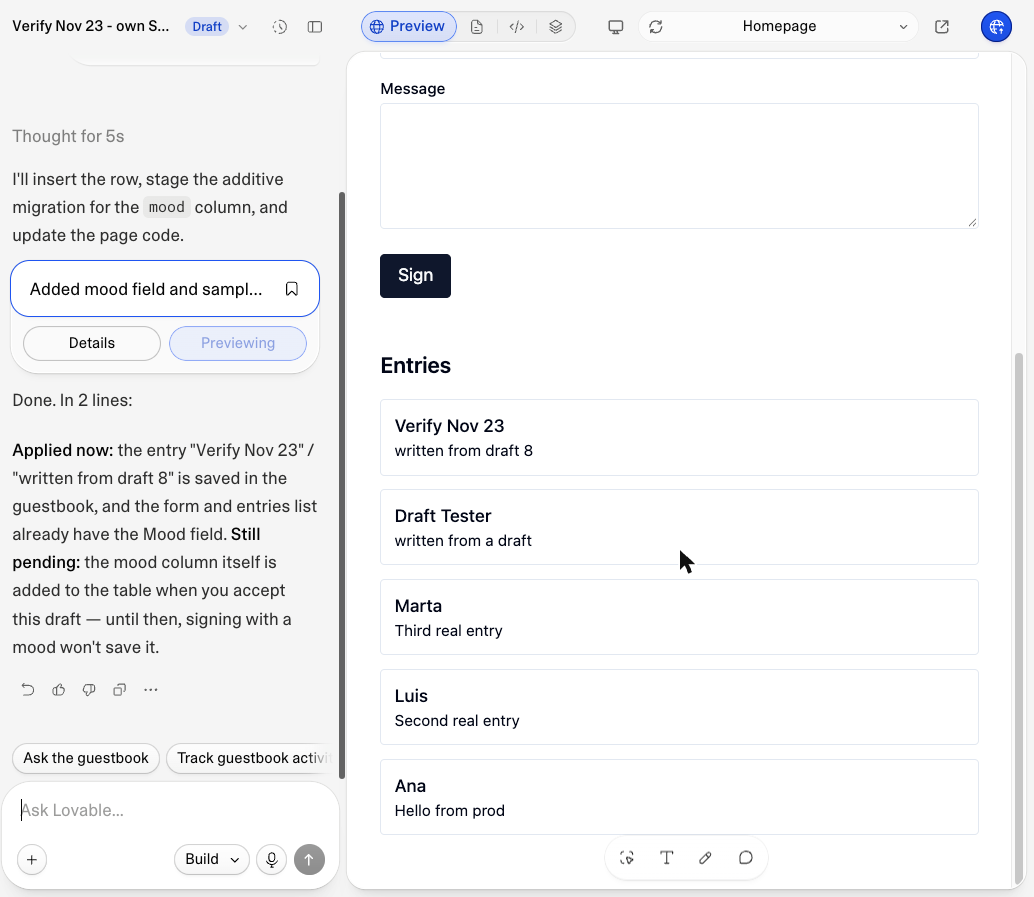
Changes to the structure of the database behave differently, and this is the part that surprised me in a good way. When I asked the draft for a new field, Lovable wrote a migration, which is a small file of instructions for changing the shape of a database, and kept it inside the draft. My real database did not change. The field only appeared after I accepted.
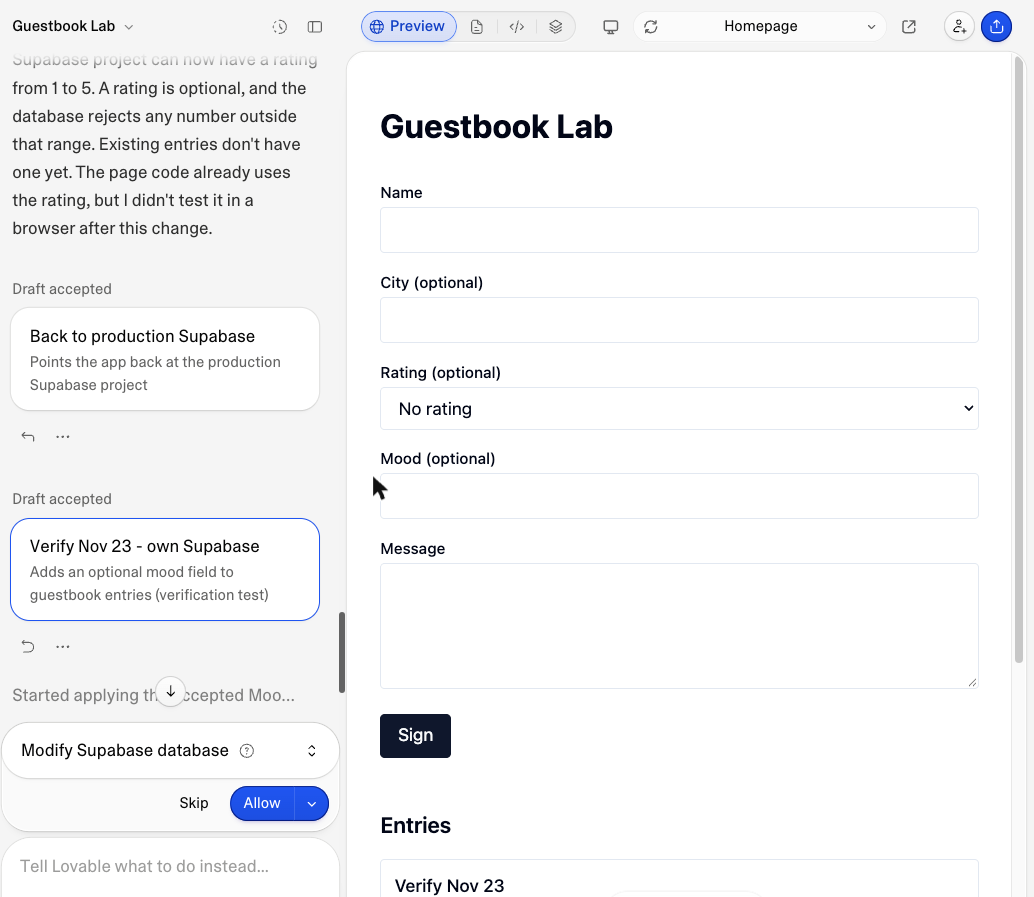
And even then there was one more step. After Accept, a card appeared in the main chat titled "Modify Supabase database", with two buttons: Skip and Allow. Until I pressed Allow, my main project had the new code and no new field to go with it. I checked the database at that exact moment, and the field wasn't there yet. So if you accept a draft like this, stay around for that card.
Here is the summary, so you can find it again later.
| In a draft with your own Supabase | What happens |
|---|---|
| Entries you add, change or delete | Real, immediately. Deleting the draft does not undo them |
| New tables and fields | They wait as migrations. They reach your database at Accept, after you press Allow |
| User accounts | Your real ones |
| The banner | There isn't one. What you see is production |
So how do I test data safely?
Once you know all this, the next question almost asks itself: if the draft uses my real database, can I give it a different one? Point it at a second Supabase project, or at a Supabase branch, and call that staging?
I tested that too, and there is more good news in it than I expected, enough that I gave it its own post. The short version: you can move parts of a draft to a second Supabase by hand, the server side of your app takes a bit more work, and for anything serious a real staging environment is still the comfortable choice. It's all in Staging on Lovable with your own Supabase.
One last thing, straight from the docs because I haven't tested it myself: in every kind of draft, secrets and connected services use their live values. If your app sends an email or charges a card through a live key, that is real, even from a draft.
Quick answers
Do Lovable Drafts work with my own Supabase?
Yes, with one big difference from Lovable Cloud: the draft uses your real database. Code changes stay in the draft until you accept. Data changes are real right away.
Is there example data in a draft with my own Supabase?
No. There is no banner and no example data. What you see in the draft is production.
If I delete the draft, are the rows it added removed?
No. A row added from a draft is in your real database, and deleting the draft does not undo it.
When are structure changes applied with my own Supabase?
At Accept, and only after you press Allow on the "Modify Supabase database" card in the main chat. Until then, your main project has the new code and no new field.
Is a draft with my own Supabase a staging environment?
No. The code is a copy, and the database is your production one. For testing data and structure you need a separate environment.
If this kept a test row out of your production database, leave a note in the reader margin below. I read every one.
This is the third post in my series on Lovable Drafts. Before it: what a draft is and how it helps you and what Accept really changes. After it: staging on Lovable with your own Supabase and common questions and quick fixes.
I tested Drafts from November 17 to 20, 2026, on four throwaway projects of my own, and repeated the tests in this post on November 23, on a project connected to its own Supabase. Sources: the Drafts docs and Lovable's announcement.
Reader margin
What stayed with you?
Leave one small mark in the margin.
Notes from readers
The margin is open. You can leave the first note.
Stuck with something like this? I fix it daily → Services