The Lovable Credits Survival Guide
Something has been happening in the Lovable community lately. This week a founder wrote something that stuck with me: "I don't want to leave Lovable. I want to feel safe staying." His project is working, companies are subscribing, and that success is exactly what made him nervous about credits.
Maybe you've felt your own version of it. You open your project in the morning and the balance is lower than you remember. Your campaign finally works and your first thought is what that traffic will cost. You delivered an app to a client and just realized their backend spends money while everyone sleeps. None of that means you built something wrong, it means credits became one wallet with many hands in it. So let's put the whole picture in one place: what is actually happening with credits, how to optimize what you're spending, and how to plan so a good traffic day feels like a win instead of a threat. Whether you're building your own product or building for clients, this is that guide.

This guide is one map with four stops. Jump straight to where you are:
- What's actually happening - the documented cost model, what building costs, what running costs, what happens at zero
- Optimize before you panic - my own numbers, the full diagnostic prompt, seven leaks with paste-ready prompts, and the MCP shortcut
- Strategy for your own product - baselines before campaigns, budgeting build vs run, keeping your project portable
- Strategy when you build for others - decide the workspace first, put run credits in the contract, deliver a handoff kit not a mystery
The 60-second plan
If you only do five things after reading this guide:
- Open Settings → Plans & credit usage → Usage details.
- Find the category using the most Run credits.
- Paste the full diagnostic prompt below and ask for a plan, not changes.
- Fix one leak, then measure again next week.
- Set a top-up limit and keep a current export before your next traffic spike.
What's actually happening
Before we optimize anything, let's understand the model, and I mean the documented one, not the vibes. Lovable's docs actually answer more of this than most builders realize, so this section is me reading them with you, sources included. The short version (credits and usage docs, Cloud docs, pricing): one credit balance pays for three things, building your app, running its Cloud backend, and the AI features inside your deployed app. Build credits are what the agent spends when you prompt it. Run credits are what your app spends by existing and serving users. One wallet, two very different personalities.
Some history helps here: for a good while, Cloud usage was effectively free while the feature matured, and Lovable was upfront that this was temporary. That grace period ended, so backend spend that used to be invisible now shows up in the same balance you build with, and a lot of the shock people feel is really that transition landing. I'm not going to argue here about which model is better, but I'll share the part of the unification nobody mentions: the credits I had piled up and never used are now spendable on everything, my backend, AI features, all of it. It cuts both ways. And there's a lifecycle hiding in that: you won't be building at full intensity forever. The credits that bought construction in month one can buy your users better features in month six, same wallet, different stage of your product's life.
What building costs
The build side is documented down to the decimals. Plan mode costs 1 credit per message. Build mode varies with complexity, and the docs give real examples: making a button gray runs about 0.50 credits, removing a footer 0.90, adding authentication 1.20, a landing page with images around 2. And here's the detail most people miss: the exact cost of every message is visible under More options, Credits used, right below each agent response. If a prompt cost more than you expected, you can see it instead of guessing.
What running costs
The run side is documented in categories. These are the official ones, in plain language:
| Category (docs name) | Plain language | When it surprises people |
|---|---|---|
| Database server | your Postgres instance doing work | heavy queries, missing indexes |
| Database storage | the data itself | tables that only ever grow |
| Network | data in and out: API responses, images, media | serving full-size images to every visitor |
| Storage | uploaded and generated files | uploads nobody cleans up |
| Compute | backend code running: payments, emails | functions called in loops |
| Realtime | live updates: chat, notifications | features subscribed "just in case" |
On top of Cloud, AI features in your deployed app bill through the AI gateway, and that's metered by model choice, input and output tokens, and how often your users trigger the calls.
Grants, rollover and the spending order
The grants are documented too, and their order matters. Plans come with usage-specific grants: on Pro and Business, 5 daily build credits; on Free, 5 per day up to 30 per month; and on all three plans, a 20-credit monthly Cloud grant and a 4-credit monthly AI grant. Cloud and AI grants are a temporary offering and may change. Lovable spends those before touching your general credits, and unused general credits roll over but expire (two months after issue on monthly plans). If your balance ever seemed to move weirdly, this spending order is usually the explanation. The pricing page even says it plainly: for most smaller apps, hosting "does not cost anything", the included grants cover it.
What happens at zero
And the question everyone asks has a documented answer. If your balance hits zero: building stops with a dialog, AI features in the deployed app stop responding, and backend services pause, but your data is preserved and your published site stays live. Everything resumes when credits come back, through a top-up or the next grant refresh. Knowing that is half the anxiety gone.
The cheat sheet
Here's all of it as one cheat sheet, the numbers that actually explain the price:
| What | The rule |
|---|---|
| Plan mode | 1 credit per message |
| Build mode | varies with complexity: ~0.50 for a small tweak, up to ~2 for a landing page with images |
| Cost of any message | visible under More options, Credits used, below each response |
| Included grants | Free: 5 build credits per day, up to 30 per month. Pro and Business: 5 per day. All three plans: 20 Cloud + 4 AI monthly. Cloud and AI grants are temporary and may change. |
| Spend order | grants first, then the general credits closest to expiring |
| Rollover | unused general credits carry over, expiring two months after issue on monthly plans |
| Top-ups | about $0.30 per credit on Pro, last 12 months, auto top-up with a monthly spend limit |
| Balance hits zero | building and AI features pause, backend pauses, data preserved, published site stays live |
| Small apps | hosting typically costs nothing, the grants cover it |
Put together, that's more predictability than the vibe suggests: your build costs are visible per message, your run costs are visible per category, a spike has a knowable ceiling if you set auto top-up with a spend limit, and running out is a pause, not a loss.
Where to look first
With the model clear, the first honest step is not cutting anything. It is opening Settings, then Plans & credit usage, then Usage details, and looking at which category is actually eating your balance. You can filter by credit type, project, and time range. Most people who feel "robbed" have never opened this screen, and most who look find one category responsible for the majority of the spend.
Here's the surprise from actually reading all of it: the documentation is better than its reputation, it's just scattered. The model lives on one page, the optimization list on another, and the deeper technical guidance sits in Supabase's docs because that's what runs under Cloud. What no single page gives you is the connected picture, plus the patterns that only show up in real apps. That's the map builders are drawing together in the community, and the rest of this guide is my contribution to it.
One more thing worth watching, and this is my own observation rather than a documented rule: in my workspace, reopening a project has sometimes coincided with preview rebuild activity before I send a prompt. Treat that as a reason to check Usage details, not as proof that every open editor tab is spending credits.
Optimize before you panic

The official quick wins
Once you know which meter is hungry, you can feed it less. Start with the official levers, because Lovable's project usage page actually ships a ranked optimization list that almost nobody has read: pause the Cloud backend of projects you're not actively using, right-size the database instance (bigger tiers cost more per hour), delete stored files you don't need (they keep billing even when the project is paused), and review how often your scheduled jobs run. Those four are documented, fast, and need no code changes. In most of the apps I see discussed, the quick wins are sitting in plain sight, this is very fixable territory.
My own numbers
Let me make it concrete with one of my own apps. Here's my actual Usage details screen, last 30 days:
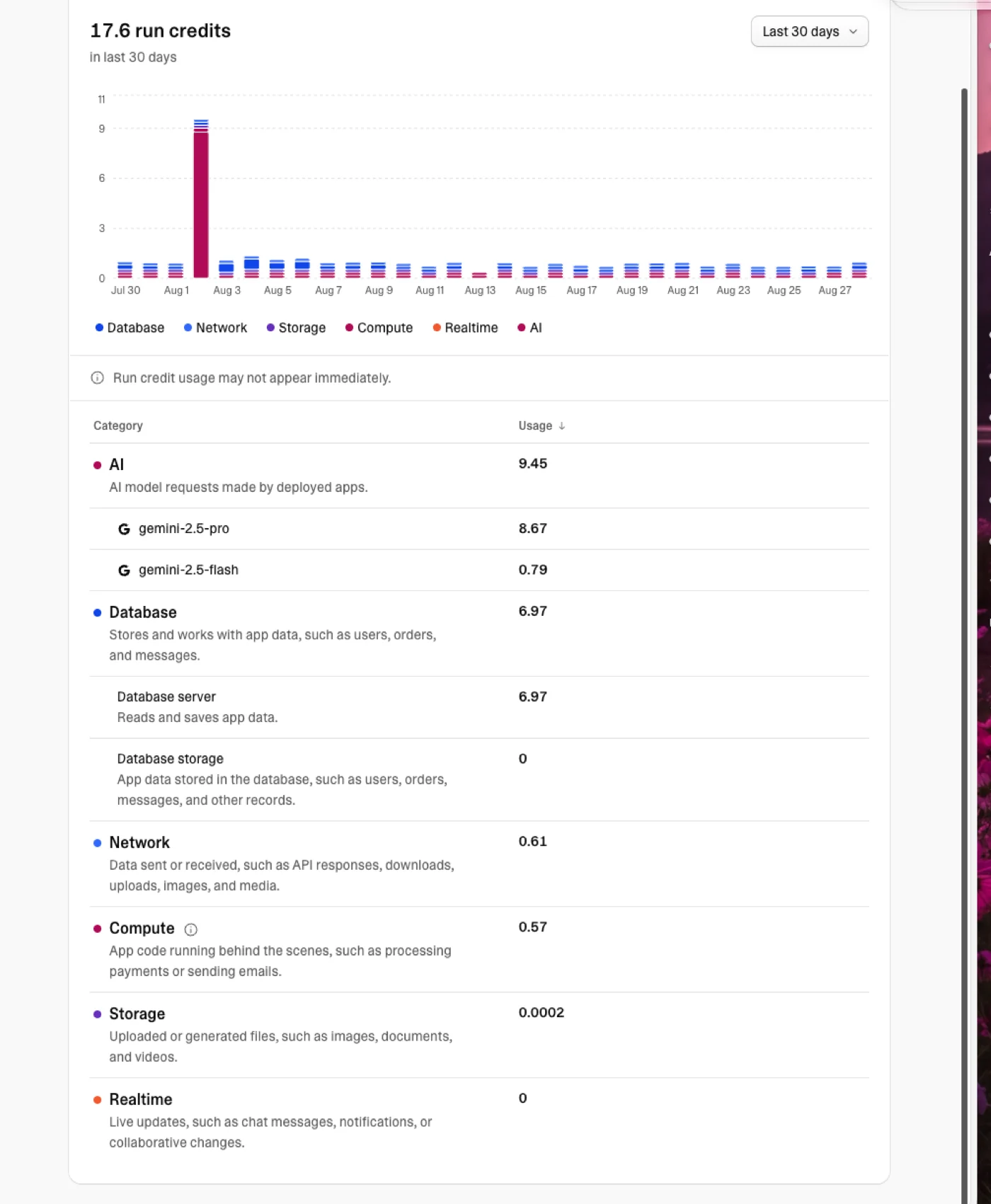
17.6 run credits total. AI was my biggest category at 9.45, and inside it the story gets interesting: about a hundred small AI runs (the app scans receipts) on gemini-2.5-flash cost 0.79 credits combined, that's under a cent of a credit per scan, while a handful of calls on gemini-2.5-pro cost 8.67. Same app, same kind of task, roughly ten times the price for the bigger model. Sized right, AI features are some of the cheapest value your credits can buy. Database server came second at 6.97, network 0.61, everything else basically zero, and a normal day runs under half a credit. One look at that chart and I know my next two moves: route more of the AI work to the smaller model, and check what the database was doing on the one spike day.
That per-run detail lives in a screen most builders never open: AI Activity, inside your project's monitoring:
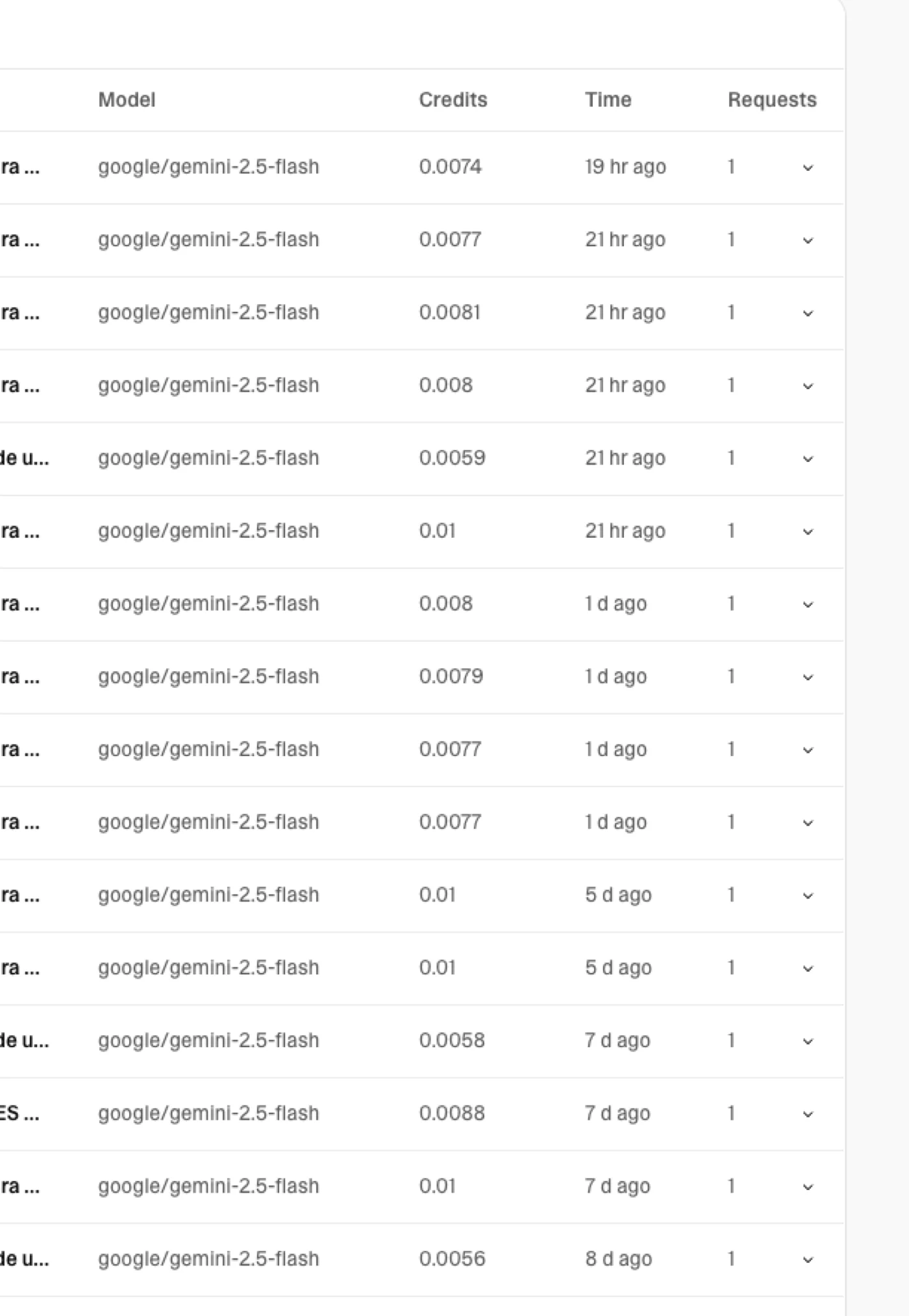
Read how your app's prompts are actually formulated: verbose prompts and oversized models are the two quiet multipliers, and both are one edit away.
The full diagnostic prompt
Then come the wins that take a little investigation, and here's the genuinely optimistic part: you already own the best optimization tool for a Lovable app, the agent itself. It knows your code, it can audit your whole app, and it works for the cost of a prompt. This is the only prompt you need, the full diagnostic:
Run a full credit-usage diagnostic of this app and change nothing yet. Review database indexes and query patterns, network and image serving, storage, realtime subscriptions, polling, scheduled jobs, and AI calls. Turn what you find into an optimization plan ordered by impact, and for each step tell me: what you would touch, what could break for users, and your honest call on whether it's worth the risk. Wait for my approval, we'll go one step at a time.
Three safety rails are baked into that prompt: the agent diagnoses before touching anything, it discloses what each change could break before you say yes, and nothing moves without your approval. That's what a responsible optimization pass looks like. Never say "optimize everything", that's how you spend fifty credits fixing things that weren't broken.
The seven leaks and their prompts
And when you want to hunt one specific leak, here's the menu. Each one explains what it means for your credits and gives you a prompt you can copy and paste:
Missing indexes. Filtered and sorted columns without indexes make Postgres work harder on every single request. That extra work bills as database compute credits.
Diagnostic only, change nothing: which of my frequently filtered or sorted columns have no index? Rank by likely impact.
N+1 queries. A list page that runs one query per item instead of one query for all of them multiplies your database compute by the length of the list.
Find N+1 patterns in my data fetching and show me the worst three with a single-query fix for each. Change nothing yet.
Realtime nobody watches. Live subscriptions bill realtime credits while they're open. Half the ones I see could be a regular fetch on page load.
List every realtime subscription and what it powers. Flag any that could be a regular fetch on page load.
Polling loops. Code that asks the database "anything new?" every few seconds compounds database compute and network credits fast.
Find every polling loop or interval that hits the backend, how often it runs, and what it fetches.
Full-size images. Egress credits pay for data leaving your backend. Serving original uploads to every visitor pays their full size every time.
Where does the app serve images at original size that a resized or compressed version would cover?
AI on public pages. Every AI call in your deployed app draws AI gateway credits. A public page that calls AI without rate limiting is an open tap for anyone who finds it.
List every AI call, what triggers it, how often it can fire, and what could be cached, rate limited, or gated behind login.
Fix-it loops. Five vague prompts cost five times one clear prompt. "Still broken, try again" is the most expensive sentence in Lovable.
Diagnostic only: read the current error, explain the root cause in one short paragraph, and propose the smallest fix. Wait for my OK.
One extra habit closes the build-side leak for good: fill in your project's Knowledge, an agent that already knows your app wastes fewer prompts rediscovering it.
Run one change at a time, review each diff, measure again next week. Optimization you can't measure is just anxiety with extra steps.
The MCP shortcut, with guardrails
There's also a route most builders haven't tried: the Lovable MCP. If you use Claude, ChatGPT, or another supported client, it can help inspect your project, reason through the problem, and bring you back to Lovable with one surgical prompt instead of ten exploratory ones. But treat it as a live account connection, not a free sandbox: Lovable's current docs say MCP tool calls use real credits, the client can access every project your account can access, and database queries run with your full database permissions.
The real advantage is better input. Let your external AI be the translator: describe the intent in your own words, let it carry the context of your app, and turn that into a well-structured prompt in the agent's language. Better input means fewer retries and less exploratory build spend. Read what Lovable MCP unlocks and how to connect Lovable and Supabase MCP to Claude.
And when you want to go deeper, go to the source: Cloud runs on Supabase, so Supabase's own optimization docs apply at the technique level. Supabase's usage guide breaks down every category with ways to reduce it, and the query optimization guide covers indexes, EXPLAIN, and the index_advisor tool. Same knowledge, and it stays useful if you ever run your own Supabase.
Strategy for your own product
Optimizing gets you efficiency, but the founder from the intro wasn't asking about efficiency, he was asking about predictability, and that comes from strategy, not from prompts. It starts with a mindset shift: we're past the build-something-quick era, and if your product is serious, its economics deserve the same design attention as its screens. Three habits cover most of it.
Know your baseline before you need it. Take your last 30 days of usage as the number your app costs at current traffic. Before a launch or a campaign, multiply: if the campaign should triple traffic, budget roughly triple the run side and decide your top-up ceiling in advance. On paid plans, auto top-up with a monthly spend limit exists for exactly this: it keeps a spike from pausing your backend while capping what the month can cost you. You will not predict it perfectly, and you don't need to. You need to stop being surprised.
Budget building separately from running. Build spend is a choice you make sprint by sprint. Run spend is your production continuity. Treat them as two budgets even though they share a wallet: decide what you'll invest in building this month, and protect the margin your live app needs. When the balance gets tight, pause building, never production.
Keep your project portable, calmly. A monthly data export includes schema, data, RLS policies, functions, and even password hashes. Together with GitHub sync, it means your app is never trapped. This is not an exit plan, it is the same hygiene as backups, and it changes how staying feels: you stay because it works, not because you can't leave.
And if you're wondering whether you'll eventually need your own Supabase: move when you hit a concrete wall, like needing the full dashboard, direct SQL, or credentials for external tools, not by default. Some classic reasons to migrate are gone, custom auth emails for example now live right in Cloud. I wrote the honest comparison between Lovable Cloud and Supabase and what owning your backend actually costs.
Strategy when you build for others

Everything above assumes the credits are yours. The moment you build for a client, the game changes, because now someone else's app can stop working over a balance they didn't know existed. Transfers stuck between accounts, freelancers locked out of client projects, apps down because nobody owned the top-up: I've watched all of it happen in the community, and all of it is preventable with decisions made before the first prompt.
And if you're reading this after already delivering the app, it's not too late, it just changes your job this week: optimize what you shipped, for your client's bill and for your own pocket, and start teaching them how the wallet works. A client who understands their usage screen is a client who doesn't call you in a panic.
Decide the workspace first. The cleanest setup is building inside the client's workspace from day one: they own the project, the billing, and the history, and you work through an invite. Building in your own account and transferring later works, but transfers have friction (roles, billing, leftover workspaces), and you don't want to discover that friction on delivery week. And price reality in from the start: I would include at least a year of the base subscription in the project price, so the app you deliver isn't one missed payment away from stopping.
Put run credits in the contract. Their app will keep spending after you leave. Write down who monitors usage, who tops up, and what happens if the balance runs out. "Your backend stops" is a terrible thing for a client to learn from an outage, and a very easy thing to put in a paragraph.
Deliver a handoff kit, not just an app. GitHub repo access, a fresh export, and one number: "your app costs about this much per month at current traffic". That baseline is ten minutes of your time and it turns you into the professional who taught them to read their own dashboard. Write it all in a one-page doc they can reread without you, and leave them the optimization prompts from this guide too.
Access hygiene. Invites and roles, never shared logins. And if a role change doesn't seem to apply, have them log out and back in before anyone panics.
The short version
Look at the meters before cutting anything. Optimize one leak at a time with the agent as your diagnostician. Know your baseline, budget build and run separately, export monthly. And if you build for clients, decide ownership before the first prompt and hand off a kit, not a mystery.
Credits feel scary when they're invisible. The builders who feel safe are not the ones with the biggest balance, they're the ones who can see where every credit goes.
The optimizer skill
I built a free tool that runs this whole audit on your Lovable project for you: it scans your Supabase backend, pulls your traffic baseline, reads your Usage details, and produces a ranked report with your biggest levers and a custom prompt. One command, no setup beyond connecting your Lovable account.
It works with Claude Code (install and run from the terminal) or from any tool that supports Claude skills. Install it:
claude install-skill CarolMonroe22/lovable-credit-optimizer
Then run /lovable-credit-optimizer or just say "optimize my Lovable credits". It's open source: github.com/CarolMonroe22/lovable-credit-optimizer
Sources
Everything documented here comes from these pages, worth keeping in your bookmarks:
Reader margin
What stayed with you?
Leave one small mark in the margin.
Notes from readers
Stuck with something like this? I fix it daily → Services
What about when build credits is the cause for high usage? Our build credit usage has been insane the last week. Its worry-some