How to Fix "Unrecognized client_id" in the Supabase MCP for Claude Code
This one has happened to me a couple of times now, and every time I go looking I find other people stuck on the exact same screen, in Claude Code, in Cursor, in Claude Desktop. So here is the whole thing in one place: what the error means, what does not fix it (I tried), and the one move that does.
What you see
You run /mcp in Claude Code, pick the Supabase server, hit Authenticate. The browser opens, and instead of the Supabase consent screen you get this:
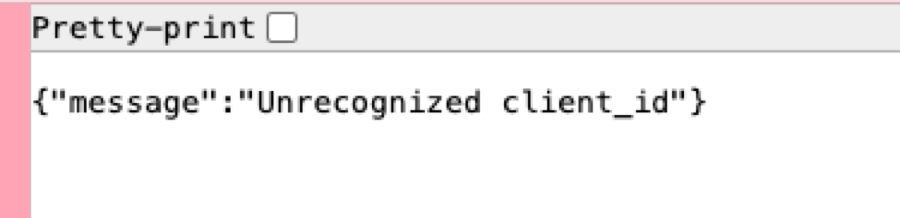
The whole page. No consent screen, no retry, nothing to click. Every retry lands on the same page. Restarting Claude Code does not change it. The Supabase status page is green, your account is fine, and the same MCP works from claude.ai. That last part is the clue.
What is actually happening
The Supabase MCP uses OAuth with dynamic client registration: the first time your client authenticates, it registers itself with Supabase and gets a client_id. Claude Code stores that registration in your keychain and reuses it forever.
Supabase, on its side, prunes old registrations. When yours gets pruned, Claude Code does not notice. It keeps sending the dead client_id on every authenticate, Supabase rejects it before the consent screen, and because the rejection happens in your browser, Claude Code never sees the error and never registers a fresh client. You are in a loop with no exit.
This is a confirmed Claude Code bug, reproduced by Anthropic on macOS, Windows and Ubuntu: anthropics/claude-code #84614. One reporter found seven dead registrations for a single server in their keychain. I found nine in mine.
What does not fix it
I went through all of these so you do not have to.
| Move | Result | Why |
|---|---|---|
| Retry Authenticate | same error | same dead client_id every time |
| Update the plugin | same error | it was already the latest (0.1.15) |
| Uninstall and reinstall the plugin | same error | the registration lives in the keychain, not in the plugin |
| Update the Supabase CLI | same error | unrelated, though 2.75 to 2.116 was overdue anyway |
| Authorize the claude.ai connector | same error in Claude Code | different connection, see below |
| Disable the plugin server, then register the server under a new name | fixed | new name, new keychain slot, fresh registration |
The fix
Claude Code keys the stored OAuth registration by the server's configuration. Give it a server it has never seen and it registers a brand new client, which Supabase happily accepts. There is one catch, and it bit me: Claude Code only shows one server per URL. While the plugin's Supabase server is enabled, anything else pointing at mcp.supabase.com is hidden behind it, and you cannot even select the new one. So the order matters.
1. Disable the plugin's server first
Run /mcp, pick plugin:supabase:supabase, choose Disable. Only the server goes off. The plugin's skills stay.

The tell: "hidden, same URL as your server". Anything sharing the plugin's URL is invisible until the plugin server is disabled.

2. Register the same server under a new name
claude mcp add --scope user --transport http supabase-mcp https://mcp.supabase.com/mcp
3. Authenticate the new one
/mcp- Pick supabase-mcp, it now shows as "needs authentication"
- Authenticate
This time the browser shows the real consent screen, you pick your organization, and the tools appear.
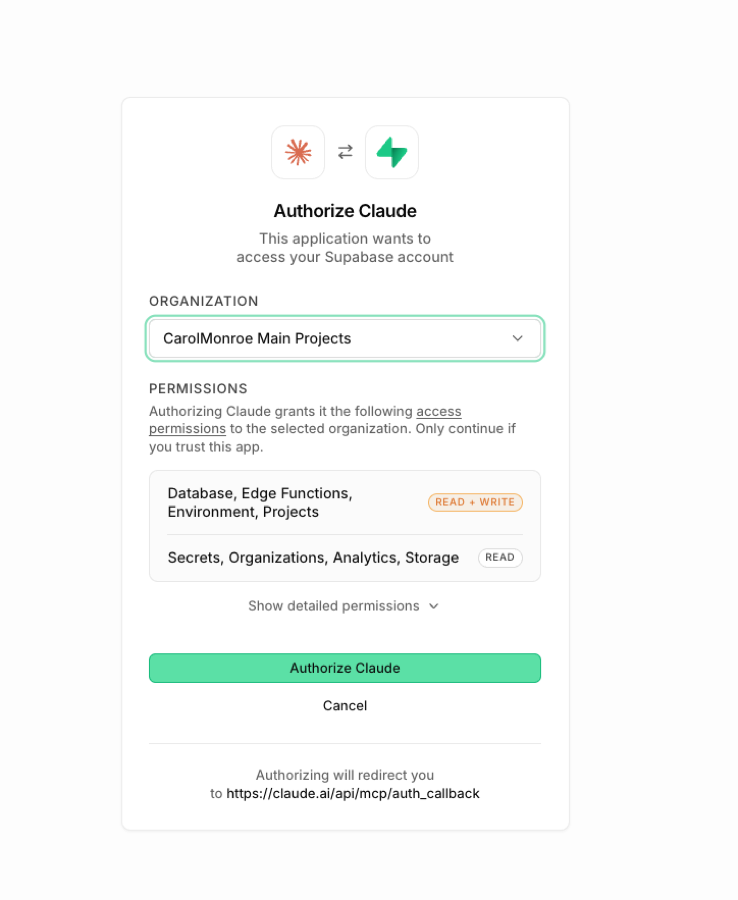
Leave the plugin server disabled. Two servers on the same URL just hide each other again. If the new name ever dies the same way, repeat the trick with supabase-mcp2.
If you would rather keep the plugin's server
The proper fix is deleting the dead registrations so the plugin registers again. On macOS they live in Keychain Access, in the item called Claude Code-credentials, as entries named mcpOAuth.plugin:supabase:supabase|…. Delete those, restart Claude Code, authenticate. On Linux and Windows the same entries sit in ~/.claude/.credentials.json. It works, it is just more surgery than a new server name.
Two Supabase connections, not one
This is the part that cost me the most time. There are two different ways Claude talks to Supabase, and they authenticate separately:
- The claude.ai connector. Set up on claude.ai, shows up in Claude Code as "claude.ai Supabase". Authorizing it ends on a page that says "Your connector was connected. You can now use it with Claude."
- The Claude Code MCP server. The plugin, or the one you add with
claude mcp add. Authorizes with the OAuth flow above, stores its token in your keychain.
Authorizing the first does nothing for the second. If you saw "connected" in the browser and Claude Code still says needs authentication, you authorized the other one.
| You are in | Use | Where it authenticates |
|---|---|---|
| claude.ai, Claude Desktop | the claude.ai Supabase connector | claude.ai, then "Your connector was connected" |
| Claude Code (terminal) | the MCP server from claude mcp add (or the plugin) |
/mcp then Authenticate, token in your keychain |
| Claude Code, read only | same server, with ?project_ref=YOUR_REF&read_only=true on the URL |
same, but the agent cannot write to that project |
Same error in Cursor or Claude Desktop?
Same bug, same idea. Supabase pruned the registration your client cached. Either delete the cached Supabase OAuth entry from your client's credential store and authenticate again, or add the server under a new name so the client registers fresh. Cursor users have been hitting this since March (supabase/supabase #43662), and the fix shape is identical.
The CLI route, no OAuth involved
The Supabase CLI never breaks this way, because it authenticates with supabase login, not with an MCP client registration. If you are in the middle of something and do not want to touch your MCP setup right now, everything the MCP does for your own projects (SQL, migrations, functions, keys) is one command away, and for one-off writes the CLI plus the REST API is honestly faster. Which tool fits which job: Supabase CLI vs Supabase MCP with Claude Code.
Sources
- anthropics/claude-code #84614, stale dynamic client registration replayed forever, reproduced by maintainers
- supabase/supabase #43662, the same error in Cursor, open since March 2026
- Supabase docs: connect the MCP server, the official
claude mcp addcommand
Reader margin
What stayed with you?
Leave one small mark in the margin.
Notes from readers
The margin is open. You can leave the first note.
Stuck with something like this? I fix it daily → Services