Supabase MCP "Requests Your Input" in Claude Code: Not a Bug, Here Is What to Do
You asked Claude Code to fix a migration, went to make coffee, and came back to this: MCP server "supabase-mcp" requests your input, an Accept button, a Decline button, and nothing else moving. Maybe for a minute. Maybe, if a subagent was doing the work, for the whole night.
Most people's first move is to reinstall the Supabase MCP. Second move: ask Claude what is wrong, and get a workaround followed by a warning not to use it. Third move: go ask in a community. I have watched that sequence enough times to write it down.
The short version: nothing is broken. That box is new, it lives on the Supabase side, it shows up even with Claude Code in auto mode, and it is doing exactly what it was built to do, which is refuse to drop your tables until a human says so. The long version is this post: what the box is, when it showed up, exactly what triggers it (I ran the statements myself, because the docs do not list them), why it hangs autonomous runs, the four ways to handle it, and the gap nobody mentions when they tell you to just use the CLI instead.
What you see
You give Claude Code a task that touches your database through the Supabase MCP. Somewhere in the middle, instead of running the SQL, it stops and shows you this:
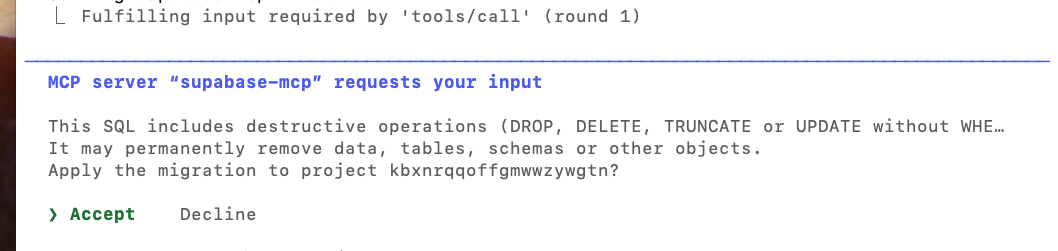
The server name in your box depends on how you installed the MCP: supabase-mcp if you added it yourself, plugin:supabase:supabase if it came from the plugin. Nothing else happens until you pick one. If you are watching the terminal, you press Enter on Accept and life goes on. If you are not watching, or the request came from a subagent running in the background, the run just sits there. For hours.
What is actually happening
This is a safety check that lives on the Supabase side, inside the MCP server, not in your install. It shipped on September 17, 2026 in mcp-server-supabase 0.13.0, with the release note "confirm destructive SQL via elicitation". The hosted server at mcp.supabase.com picked it up right away, which is why people started seeing it "a few weeks ago" with no change on their end.
The mechanism has a name, elicitation, which is a formal way of saying "the server asks you a question before it continues". It is part of the MCP protocol: a server can pause a tool call in the middle and hand the client (Claude Code) a question to put in front of a human. The server asks, the client decides how to show it, a person answers, and only then does the tool call finish. In Supabase's case the question is always the same: this SQL deletes things, do you want it to run?
Not every client can show it. Claude Code supports form elicitation, so you get the box. The Supabase connector inside claude.ai does not surface it: I ran the same DROP TABLE through both on the same project, and claude.ai executed it with no question asked. Same server, same SQL, different client. Supabase does not publish a per-client list, their docs say to check your client's documentation for the modes it supports, so if you use Cursor, Claude Desktop, Windsurf or anything else, assume nothing until you have seen the box yourself. On a client without support, the tools run under their normal behavior, and your only protections are permissions and read-only mode.
Three things follow from "it lives on the server":
- Reinstalling the MCP, updating Claude Code, or clearing your config does nothing. The check is not in any of those places.
- It appears even with Claude Code in auto mode. This is the one people miss. Auto mode answers Claude Code's own tool permissions, and nothing else. The elicitation is a separate question from a different party, the server, and the docs say it plainly: server elicitation does not replace your client's approval of tool calls, and your client's approval does not replace it. Two gates, two keys. Auto mode opens one of them. As long as the check is active on the server, the box will stop an auto mode run exactly like it stops a manual one.
- Only the person in the main Claude Code session can answer it. Not Claude, not a subagent. The box is designed so that a human is the one who says yes to a
DROP.
The official docs cover this on the Supabase MCP page and in a troubleshooting note titled SQL confirmations do not appear in your MCP client. Notice the title: the docs are written for the person who is not seeing the box. This post is for the person who is.
What it protects, and why that matters
Think about what an agent does when a migration fails. It reads the error, forms a theory, and tries the fastest fix it can think of. Very often the fastest fix is "drop the table and recreate it". From the agent's point of view that is a clean solution. From yours, it is your users table.
Before September 17, nothing stood between that theory and your database except whatever permission dialog your client happened to show, and auto mode removes even that. Now there is one more gate, and it is the right one: not "may Claude run SQL" but "may Claude run THIS statement, the one that deletes things". It asks exactly when the cost of being wrong goes from annoying to permanent.
Supabase is careful about what it promises. In their words it is "a guardrail, not a guarantee" of human review. Detection can miss a destructive statement, some clients auto-answer through hooks or rules, and none of it replaces backups or the security recommendations. Fair. But a guardrail that catches DROP, DELETE and TRUNCATE on every migration is a guardrail I want, and the rest of this post is about keeping it without letting it wreck your day.
What triggers it
The docs say the check fires on "destructive SQL" and leave it there. So I ran statements one by one through execute_sql and apply_migration on a throwaway project to see what counts.
| Statement | Box? |
|---|---|
CREATE TABLE ... |
no |
ALTER TABLE ... ADD COLUMN |
no |
INSERT, SELECT |
no |
DELETE FROM t WHERE false |
yes |
DROP TABLE IF EXISTS t |
yes |
TRUNCATE t |
yes (per the dialog text) |
UPDATE t SET ... without WHERE |
yes (per the dialog text) |
The one that surprises people is the DELETE. The dialog text says "UPDATE without WHERE", and most of us read that as "DELETE without WHERE" too. It is not. A DELETE triggers the box even with a WHERE clause, even one that cannot match a single row. So a routine cleanup like delete from logs where created_at < now() - interval '30 days' will stop your run.
One box per statement. If your migration has three destructive statements, you answer three times. Additive migrations never ask.
Two more details from the docs that matter in practice: with read-only mode on, execute_sql cannot write, so it never asks. And the detection is a guardrail, not a guarantee. Supabase says it plainly: a missing prompt does not prove the SQL is safe. Do not run a DROP just to see if the box appears.
Why a subagent makes it hang
This is the part that turns a two-second pause into an all-night one.
When you run Claude Code interactively and the SQL goes through the main session, the box appears in front of you and you answer it. When a subagent makes the call (a @general-purpose worker, a parallel task, anything spawned to run on its own), the elicitation still has to be answered by a human, and the only human-facing surface is the main session. So the box lands there. Meanwhile the subagent is blocked waiting for the server, the server is waiting for the client, and the client is waiting for you. If you walked away, nobody is coming.
There is no timeout. There is no "a subagent is waiting on a confirmation" message. The run looks hung, because it is.
The four ways out
Here is the thing about this section: every option below is a decision you make, not something the agent makes for you. That is on purpose. The whole point of the box is that a human decides what happens to the data, and you cannot delegate that decision 100% to the agent and also expect the agent to stop itself. So you need a working idea of what you are building on: which project is production, which is a sandbox, which runs have a person watching and which do not. If you do not know that yet, start there. The table at the end helps, and option 3 is the right default while you figure it out.
1. Answer it
When the box shows up, press Enter on Accept and the run continues. This is the right default for anything with real data in it. Yes, it means you have to be there. That is the point.
2. Turn it off for that server
The hosted server accepts a skip_elicitations parameter in its URL, with the exact tool names you want to exempt. The Claude Code plugin's URL is fixed, so you add the server yourself and disable the plugin one in /mcp:
claude mcp add --scope user --transport http supabase-mcp \
  "https://mcp.supabase.com/mcp?skip_elicitations=execute_sql,apply_migration"
Tool names are case-sensitive and there is no all switch. Leaving one of them out keeps the box for that tool. This removes the safety net entirely for that connection: Claude can now drop tables and nobody is asked. Fine on a dev project. On production, think twice, and read option 4 first.
3. Keep the check, stop hitting it
Most runs do not need destructive SQL. Tell Claude so, once, in your CLAUDE.md:
## Database rules
- Migrations are additive only: create, alter add, insert.
- Never write DROP, DELETE, TRUNCATE, or UPDATE without WHERE
  unless I ask for it explicitly in the same message.
- If a change needs one of those, stop and show me the statement first.
With that in place the box simply stops appearing in normal work, and when it does appear it is because something genuinely destructive is about to happen, which is exactly when you want to be asked.
4. Let a hook answer for you
Claude Code has an Elicitation hook that runs when any MCP server asks for input. A script can accept, decline, or leave it to the dialog. This is the option for autonomous runs where you still want a rule, just not a human: for example, accept on your dev project, decline on anything else.
Register it with the server name as the matcher:
{
  "hooks": {
    "Elicitation": [
      {
        "matcher": "supabase-mcp",
        "hooks": [
          { "type": "command", "command": "$HOME/.claude/hooks/supabase-elicitation.sh" }
        ]
      }
    ]
  }
}
Do this in two steps. First, a script that only logs the request, so you can see the exact message and requested_schema the Supabase server sends (the dialog still appears, because the script prints nothing):
#!/bin/bash
# step 1: capture only. prints nothing, so the dialog still appears.
cat >> "$HOME/.claude/hooks/elicitation.log"
exit 0
Trigger one harmless delete from some_table where false on a dev project, open the log, and you have the field names. Then write the real script. The shape is the one from the hooks docs: to decline, exit 2; to accept, exit 0 and print a hookSpecificOutput with action: "accept" and a content object whose keys match the requested_schema; to leave it to the dialog, print nothing.
#!/bin/bash
# step 2: accept only on the dev project, decline everywhere else.
input=$(cat)
msg=$(jq -r '.message' <<<"$input")
case "$msg" in
  *"<your-dev-project-ref>"*)
    jq -n '{hookSpecificOutput: {hookEventName: "Elicitation", action: "accept", content: {}}}'
    ;;
  *)
    exit 2   # decline, no dialog, the SQL does not run
    ;;
esac
Fill content with whatever the schema asked for. Do not ship an accept that matches every message. Do not point the dev branch of this script at a production ref "just for today". The hook is a rule you wrote down, so write the rule you actually want.
The gap nobody mentions
Here is the uncomfortable part. When the box stops Claude, Claude's own suggestion is often "I can run this through the Supabase CLI instead" or "give me the connection string and I will apply it with psql", sometimes followed by its own warning not to do it. If you have seen that exact pair of messages, you are not alone.
Claude ──MCP (mcp.supabase.com)──►  destructive check  ──►  Postgres
Claude ──supabase db push ────────────────────────────────►  Postgres
Claude ──psql / connection string ────────────────────────►  Postgres
Only the first path has the box. The CLI and a raw connection run whatever they are given. supabase db push does prompt before applying migrations unless you pass --yes, but it lists file names, it does not read the SQL inside them for a DROP. There is nothing in the CLI docs about inspecting migration content, and I could not make it do so. An agent with --yes in its command does not even see the file list.
So if your workflow moves to the CLI, the protection moves to you. The cheapest version is a PreToolUse hook on Bash that stops the dangerous commands and asks:
#!/bin/bash
cmd=$(jq -r '.tool_input.command')
if echo "$cmd" | grep -Eq 'supabase (db push|db reset|migration up)|psql '; then
  jq -n '{hookSpecificOutput: {hookEventName: "PreToolUse",
          permissionDecision: "ask",
          permissionDecisionReason: "Database command: review before it runs"}}'
fi
Register it under PreToolUse with "matcher": "Bash". It does not block anything, it turns those commands back into a question, which is the same thing the Supabase box does on the MCP path.
Which one to pick
This table is how I run my own projects. It is based on my preferences and my risk tolerance, so treat it as a starting point and adjust it to your environment, your team, and how much a bad DROP would cost you.
| Your situation | What to do |
|---|---|
| Production, real users, real data | Keep the box. Answer it. Add the CLAUDE.md rule so it rarely appears. |
| Dev or sandbox project | skip_elicitations on that server, or an Elicitation hook that accepts only that project ref. |
| Autonomous runs against production | CLAUDE.md rule (additive only) plus an Elicitation hook that declines. The run fails loud instead of hanging silent. |
| Agent switched to CLI or psql | PreToolUse hook on Bash. The box is gone, put one back. |
| Read-only tasks | Keep read-only mode on. No writes, no box, no risk. |
The 30-second checklist
Next time Claude Code stops on "requests your input":
- Read the statement in the box. It is the one about to run.
- Did you ask for something destructive? Accept. Did you not? Decline, and ask Claude what it was trying to do.
- Was it a subagent? Expect the box in the main session, and expect it to wait for you.
- Happening on every task? Add the
CLAUDE.mdrule above. That is the fix for "it keeps interrupting me". - Need it gone on a dev project?
skip_elicitations, on that server only. - Claude offering the CLI as a workaround? That is the box being removed, not solved. Put a
PreToolUsehook in its place.
The box is the only thing standing between an agent that is "fixing a migration" and a table that is gone. It arrived without much announcement, and it reads like a bug the first time. Once you know what it is, it becomes the one interruption I am happy to see.
If you hit a statement that triggers it and is not in my table, or one that should and does not, tell me. I will keep the table current.
Documentation
- Supabase MCP server, the official page, including the Elicitations and
skip_elicitationssections - SQL confirmations do not appear in your MCP client, the troubleshooting note for the opposite problem
- mcp-server-supabase releases, where 0.13.0 (September 17, 2026) introduced the destructive SQL confirmation
- Claude Code hooks, the
Elicitation,ElicitationResultandPreToolUseevents used in this post - Supabase CLI: db push, with
--dry-runand the global--yesflag
Reader margin
What stayed with you?
Leave one small mark in the margin.
Notes from readers
The margin is open. You can leave the first note.
Stuck with something like this? I fix it daily → Services