Understanding Security Scan Errors in Lovable
The Problem
You open your Lovable project and see red security warnings like:
- Customer Personal Information Exposed to Public Internet
- Customer Subscription and Billing Data Publicly Accessible
- Leaked Password Protection
Panic mode. But wait.
Why This Happens
Lovable's security scanner flags potential issues, but it doesn't always know the full context of your app. Sometimes it flags things that aren't actually exposed, or flags tables that don't contain sensitive data.
⚠️ Important: Before dismissing any warning, make sure you validate it. These scanners exist for a reason. Even if something looks like a false positive, take the time to confirm it 100%. Security issues can expose your users' data, and that's not something you want to find out later.
How to Validate
- Click on the specific error in the security scan
- A chat will open with details about the issue
- Ask Lovable to explain why it flagged it
- Confirm if it's a real problem or a false positive
💡 Tip: If you're unsure, assume it's real and fix it anyway. Better safe than sorry.
If It's Real
The errors usually mean your tables don't have Row Level Security (RLS) policies. This means anyone with your Supabase URL could potentially read your data.
Ask Lovable: "Add row level security policies to my [table name] table so only authenticated users can access their own data"
If You're on Lovable Cloud
Good news: you don't need direct Supabase access to fix most security issues. Lovable's built-in chat is surprisingly good at diagnosing and fixing them.
Here's what you can do:
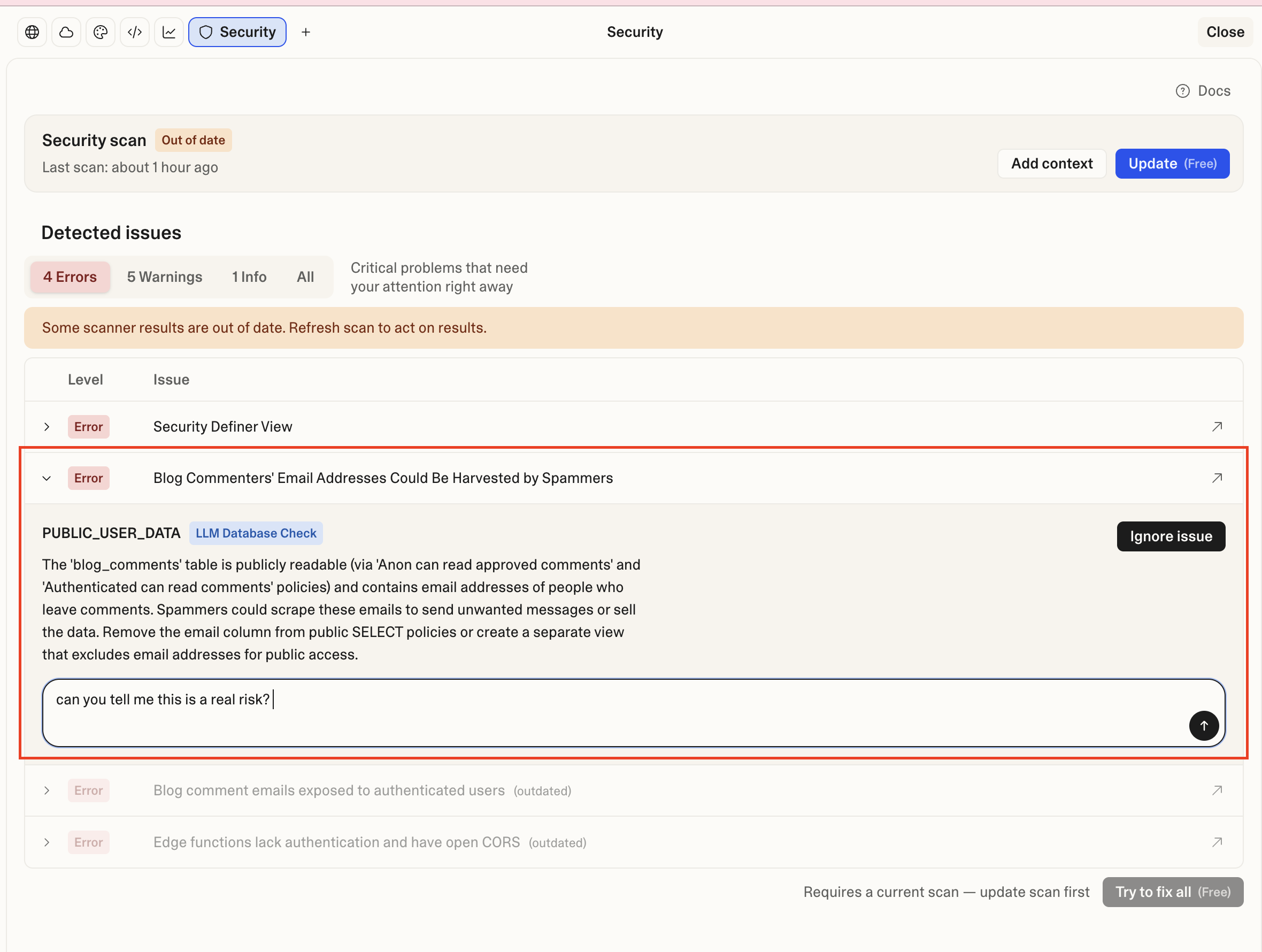
1. Click the error to open the chat
When you see a security warning, click on it. A chat window opens with context about the specific issue. You can ask Lovable directly: "Can you tell me if this is a real risk?"
2. Let Lovable analyze it
Lovable will give you a detailed breakdown:
- What the warning actually means
- Whether it's a real risk or a false positive
- The severity level (Low, Medium, High)
- What your options are
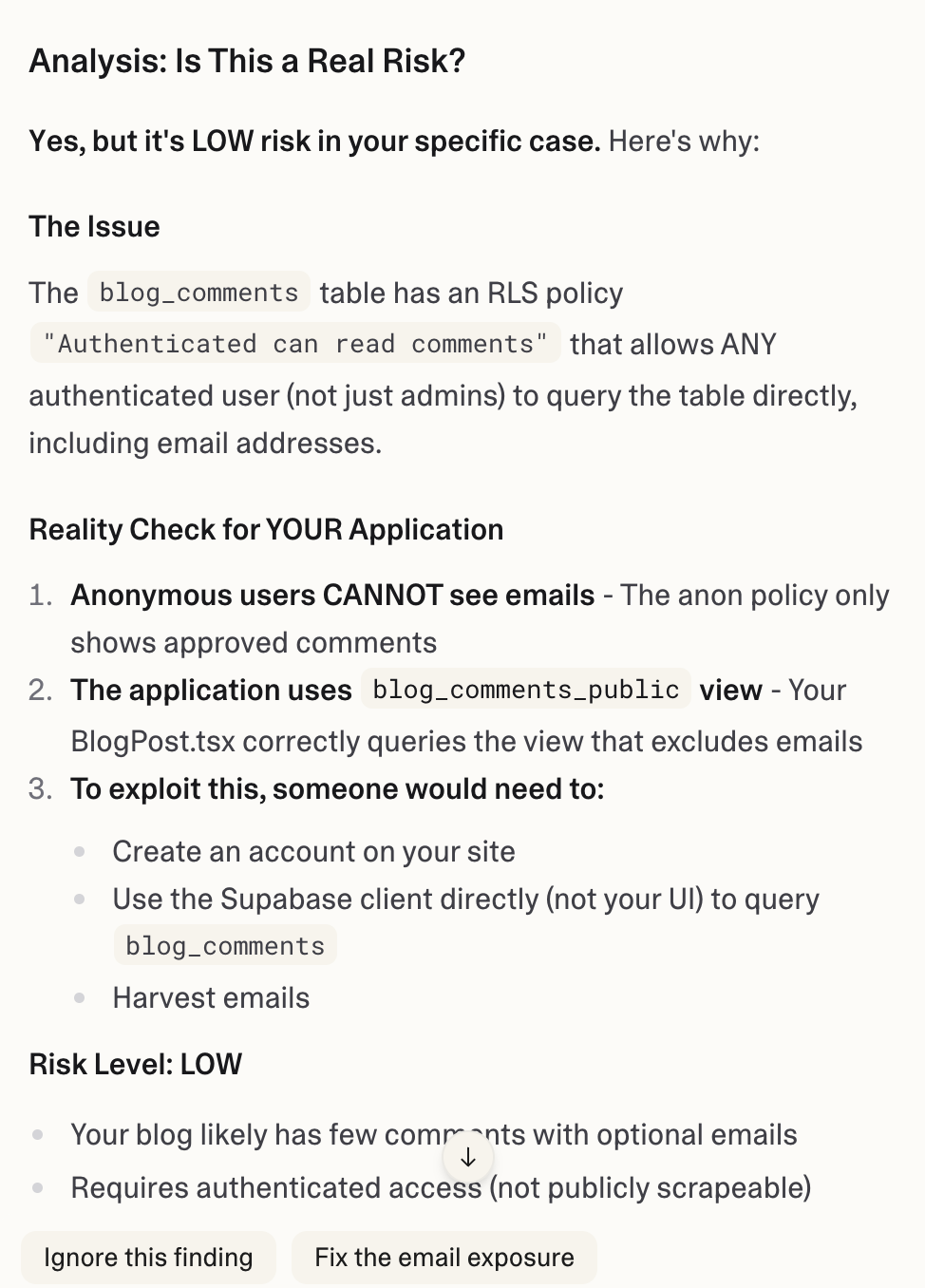
3. One-click fixes
If it's a real issue, Lovable usually offers buttons to fix it right there. No SQL knowledge needed. Click the button, confirm the changes, done.
💡 Tip: This doesn't cost extra tokens. Lovable's diagnostic chat is part of what you're already paying for. Take advantage of it.
What if Lovable can't fix it?
Rarely, you might hit something that requires direct database access. If that happens, migrating to your own Supabase project gives you full control.
But honestly? 90% of security warnings can be resolved directly through the chat. Try it first.
If You Have Your Own Supabase Project
This is where it gets interesting.
I use Claude Code with the Supabase MCP, and the workflow changed completely. Instead of switching between my code editor and the Supabase dashboard, I just say:
"Run the security advisor and fix what you find."
Claude Code runs the advisor, finds the issues, understands the context of my code AND my database, and fixes everything. No copy-pasting SQL, no manual checks.
Real example from today: I had 3 security errors (a view with SECURITY DEFINER, a function with mutable search path, and another view issue). One prompt, 2 minutes, all fixed. Claude Code rewrote the views, updated the function, and verified everything was clean.
ℹ️ What does the Security Advisor check? Missing RLS policies, views that bypass security, functions with vulnerable configurations, exposed data that shouldn't be public. Each issue comes with severity levels and explanations.
The real "pro" here isn't just running a scanner. It's the full cycle: make changes → detect issues → fix automatically → verify again. All without leaving the terminal.
If you're building something serious and have your own Supabase project, this combo is worth setting up. You can also access the Security Advisor directly from your dashboard: Database > Security Advisor
Reader margin
What stayed with you?
Leave one small mark in the margin.
Notes from readers
The margin is open. You can leave the first note.
Stuck with something like this? I fix it daily → Services